

Circuit switching
Circuit switching (or connection-oriented) is the system for temporarily connecting two users, as happens for example with the telephone in which during the phone call a temporary circuit is created that connects the two interlocutors through a
series of connections between one telephone exchange and the next.
The transmission resources (telephone, lines, portions of exchanges) remain allocated to the two interlocutors until the call ends.
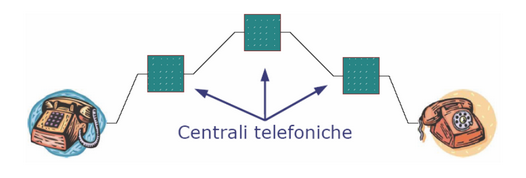
Connection-oriented services have an inefficient use of transmission resources, since if the two interlocutors do not transmit any signal (for example, they are silent) the resources are not exploited.
Example
Let's imagine we have two telephones, one in city A and the other in city B, and we want to establish a direct telephone call between them using circuit switching:
Packet switching
Packet switching (or connectionless) is a communication system that does not establish any pre-established path between two users.
The information to be sent is packaged in data packets and entrusted to the network with the recipient's address indicated, as happens for example in the postal system.
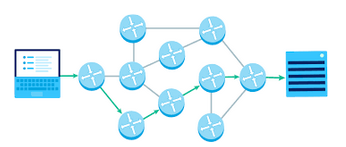
In fact, it will be the network's job to transport, and then route, the packet to its destination.
Unlike circuit switching, packet switching:
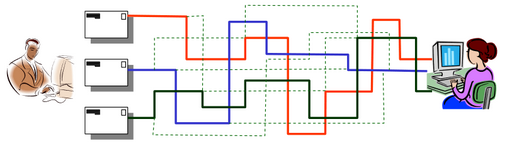
Packet switching is suitable when a delay of a few seconds in reception can be tolerated.
For example, when receiving a file or an email, the user is not aware of a delay, but in the case of a real-time event (for example, a phone call), even a second's delay is perceived by both parties.
The Internet is an example of a connectionless network.
Example
Suppose you want to send an email containing a text message and some images to a friend. Using packet switching, the process might look like this:
Types of transmission channels
There are two types of transmission channels that are widely used:
Point-to-point links (or unicast) connect pairs of computers.
Packets must visit one or more intermediate machines to move to their source or destination in a network composed of point-to-point links.
Individual point-to-point connections are called links.
In its most basic sense, a link represents the direct communication line between two nodes.
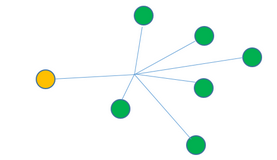
In contrast, broadcast networks have a single communication channel shared by all machines on the network: packets sent by any machine are received by any machine on the network.
Upon receiving the message, each machine checks the address field. If the address in the field is equivalent to the current machine, it is processed; otherwise, it is ignored.
Want to help me write articles like this?

No responses yet