
Transport layer: TCP, UDP, QUIC, ports, and sockets

Transport layer: TCP, UDP, QUIC, ports, and sockets are the core concepts of this lesson, which focuses on end-to-end communication between application processes.

The text explains that the transport layer is responsible for providing a logical communication channel between applications by leveraging network layer services. The main transport protocols—TCP, UDP, and QUIC—are then introduced.
TCP offers reliable, connection-oriented communication through mechanisms such as acknowledgments (ACKs), retransmission, flow control, and congestion control. UDP, on the other hand, is a simpler, faster, connectionless, and unreliable protocol, making it suitable for real-time communications such as streaming, VoIP, online gaming, and IoT applications.

The lesson also introduces QUIC, a modern protocol based on UDP but designed to deliver faster, more secure, and more efficient communication, particularly for the modern Web and HTTP/3. Finally, the concepts of ports and sockets are explained; these are essential for directing data to the correct process and managing communication between applications.

Transport layer

The task of the transport layer is to provide services to the application layer above it. To achieve this, it uses the services provided by the underlying Layer 3, the network layer. (Eddy, 2022).

The purpose of the transport layer is to provide an end-to-end logical communication channel for packets. More specifically, it compensates for limitations in data transfer by implementing functions that provide reliability guarantees for the transport itself (Eddy, 2022).

The transport layer is found only in end systems, or hosts, and provides a logical connection between application processes.
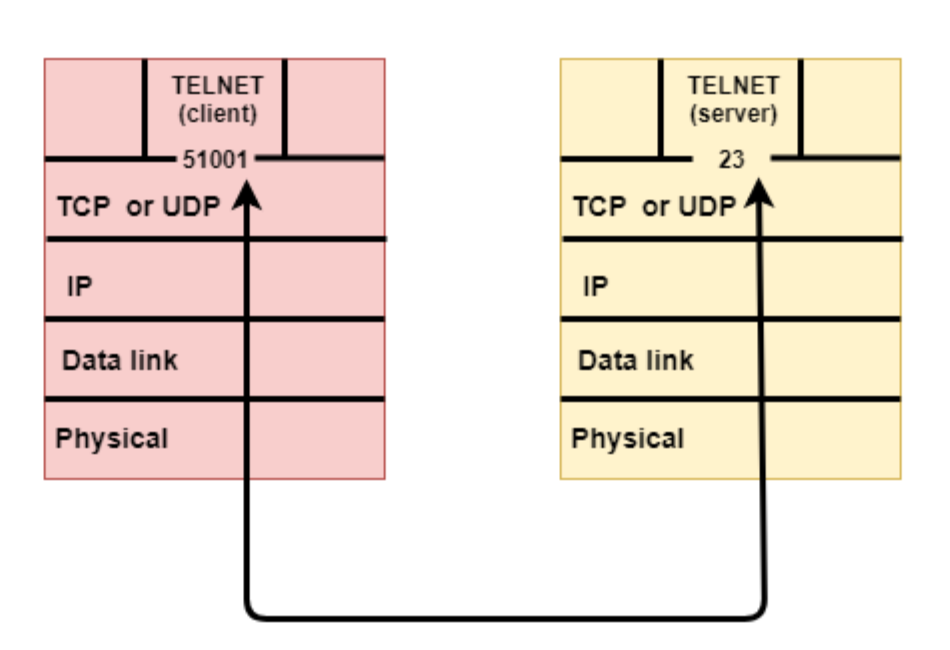
The image shows the transport layers of two communicating hosts. To communicate, their data must pass through the underlying layers.

Transport protocols

The transport layer provides the application layer with connections that have specific characteristics, particularly through the UDP, TCP, and QUIC protocols (Eddy, 2022; Iyengar & Thomson, 2021; Postel, 1980).

TCP

TCP (Transmission Control Protocol) is one of the main communication protocols used at the transport layer (Eddy, 2022).
TCP provides a reliable, connection-oriented service.
With TCP, a reliable bidirectional logical connection is established between the sender and the receiver.

The main characteristics of TCP include:

  • Reliability: TCP guarantees reliable data delivery. It uses acknowledgment mechanisms, abbreviated as ACK, error checking, and retransmission to ensure that packets are delivered intact and in the correct order. If a packet is lost or corrupted during transmission, the sender retransmits it until the receiver confirms its arrival (Eddy, 2022).
  • Flow control: TCP prevents the sender from transmitting data faster than the receiver can receive and process it (Eddy, 2022).
  • Congestion control: TCP adjusts the transmission rate according to network conditions to avoid overloading links and intermediate routers (Allman et al., 2009).
  • Connection orientation: TCP establishes a connection between the sender and the receiver before data transmission begins.

To send data through TCP, the protocol divides the message received from the application layer into smaller units called segments. These segments contain (Eddy, 2022):

  • The original data, or payload.
  • The TCP header, which contains information such as the sequence number, acknowledgment number, control information, and other parameters required to ensure correct delivery and flow control.

TCP segments are placed inside IP packets, which are created at the network layer, and transmitted across the network. IP packets may follow different routes before reaching their destination.
Once they reach the destination, the receiver reassembles the segments in sequence order and uses the control information to acknowledge their receipt. 
If a packet is not received correctly, TCP requests its retransmission from the sender to ensure data integrity and reliability.
TCP has long been, and still is, widely used on the Internet, especially for services that require reliability, such as file transfers, many web communications, email, and remote access.

A TCP connection goes through at least the following stages:
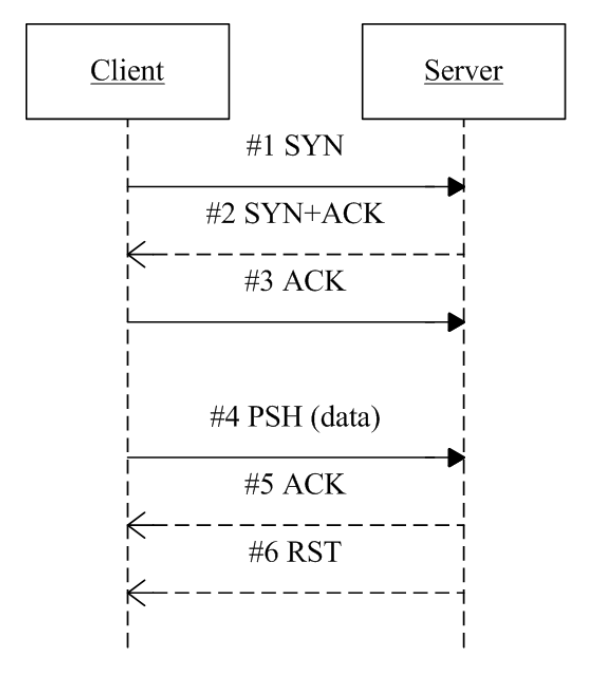
  • SYN: the client requests that a connection be opened (SYN) = “Connection initiated.”
  • SYN-ACK / ACK: the server replies with SYN-ACK, and the client confirms with ACK = “Connection established.”
  • Data Transfer / PSH: the two endpoints exchange data, using segments and ACKs = “Connection active.”
  • FIN / RST: one of the endpoints closes the connection using FIN or RST = “Connection terminated.”

UDP

Like TCP, UDP (User Datagram Protocol) is a transport-layer protocol, but it provides a very different service (Postel, 1980).

Unlike TCP, which provides reliable, connection-oriented communication, UDP is connectionless and does not guarantee reliable data delivery (Postel, 1980). 
This means that when an application uses UDP to send data to another application, the data is simply transmitted without any guarantee that it will be received or delivered correctly.
UDP therefore provides a connectionless and unreliable service.

The main characteristics of UDP are:

  • Connectionless: no connection is established between the sender and the receiver before data is sent. Data is transmitted without any preliminary negotiation.
  • Fast and lightweight communication: because UDP does not include the connection-management and error-control complexity of TCP, it is faster and introduces less overhead.
  • No flow or congestion control: UDP does not manage complex reliability mechanisms such as acknowledgments, retransmissions, and data reordering (Eggert et al., 2017).
  • Commonly used by applications that require low latency: UDP is often used when speed and low latency, meaning a short packet-delivery time, are more important than reliability, as in multimedia streaming, online gaming, and real-time transmissions.

Because UDP does not guarantee reliable data delivery, applications using this protocol must handle any data loss or errors themselves at the application layer when necessary (Eggert et al., 2017).
UDP is used when speed and simplicity are more important than reliable data delivery. Some of the main use cases in which UDP is preferred include:

  • Audio and video streams: UDP is often used for real-time audio and video streams, such as video conferencing, VoIP, and low-latency live broadcasting.
  • Online gaming: UDP is often preferred for transmitting information about players’ actions in real time. Low latency is essential for a responsive and smooth gaming experience.
  • Real-time broadcasting: in live-broadcast applications, such as sports broadcasts or real-time events, UDP is preferred for delivering a live view without buffering.
  • Local device-discovery services: on local networks, UDP is used by some device-discovery protocols when quickly finding devices on the network is important.
  • Internet of Things (IoT) applications: in some IoT scenarios, such as temperature sensors, devices need to transmit small amounts of data quickly and with little complexity, making UDP a suitable choice.

The data unit sent by UDP is called a datagram. A UDP datagram contains a header with essential control information and a payload, which is the data received from the application (Postel, 1980).

QUIC

After examining TCP and UDP, we can introduce a more recent protocol: QUIC (Quick UDP Internet Connections).
QUIC is a modern transport protocol designed to make Internet communications faster, more secure, and more efficient (Iyengar & Thomson, 2021). 
It is particularly important because it is used by HTTP/3, one of the most recent versions of the HTTP protocol used on the Web (Bishop, 2022).

An interesting characteristic of QUIC is that it runs over UDP. 
This may seem unusual because UDP is a connectionless and unreliable protocol. 
However, QUIC uses UDP as its foundation and adds many features normally associated with TCP, including reliability, congestion control, and connection management (Iyengar & Thomson, 2021).

One reason QUIC was developed was to reduce the time required to begin communication. With TCP, a connection must first be established; when HTTPS, meaning HTTP with security, is used, a cryptographic negotiation must also take place. 
This can require several steps before the actual data begins to be exchanged.

QUIC instead integrates security directly into the protocol and uses TLS-based mechanisms. This reduces the number of steps required to establish a secure connection. As a result, communication can begin more quickly in many cases (Thomson & Turner, 2021).

Another important characteristic of QUIC is its improved handling of interruptions and network changes. For example, a smartphone may begin browsing over Wi-Fi and then switch to a mobile network. 
With a traditional TCP-based connection, this change may interrupt the connection because the network address, or IP address, used by the device changes. 
QUIC is designed to handle these changes more effectively and keep communication active whenever possible (Iyengar & Thomson, 2021).

QUIC also improves the management of multiple data streams within the same connection. A modern web page is not made up of a single file: it contains text, images, style sheets, scripts, video, and many other resources. QUIC can manage several streams in parallel, reducing the risk that a delay or loss affecting one part of the data will unnecessarily block the others (Bishop, 2022; Iyengar & Thomson, 2021).
This characteristic is important because some packets may be delayed or lost during network communication. In some traditional systems, the loss of one packet can also delay data that is already available. QUIC attempts to reduce this problem by separating the different communication streams more effectively.

QUIC can therefore be viewed as a protocol that combines some of the positive characteristics of TCP and UDP:

  • Like UDP, it is built on datagrams and does not require the same rigid structure as TCP.
  • Like TCP, it can provide reliability, congestion control, and ordered data management. Unlike traditional TCP, however, it integrates security and can establish protected communications more quickly.

QUIC is well suited to the modern Web, which requires speed, security, and the ability to manage many data streams simultaneously.
QUIC is particularly important because it forms the foundation of HTTP/3, the most recent version of HTTP (Bishop, 2022).

Port

In a networked system, a port is a logical number used to identify a specific communication channel within a host (Cotton et al., 2011).
It is one of the fundamental elements that allows several applications on the same host to use the network simultaneously without interfering with one another.

Imagine the telephone switchboard of a large company. 
All the telephones are connected to a single number, representing the actual address. When you call that number, however, you can be connected to different extensions, such as sales, support, or administration. The telephone number is like the computer’s address, while the extensions are like its ports.

To summarize:
Ports allow a host to maintain several different simultaneous communications with other hosts, ensuring that data belonging to a specific service is directed to the process waiting for it (Internet Assigned Numbers Authority [IANA], n.d.).

In TCP- or UDP-based communications, ports are used to associate data with the correct application process (Cotton et al., 2011).
A network communication does not involve only one port: it usually has both a source port and a destination port.

  • The destination port identifies the service to which we want to connect. For example, an HTTPS web server normally listens on port 443.
  • The source port is chosen by the device that initiates the communication. It is often a temporary port assigned automatically by the operating system.

This allows the computer to distinguish several communications that are active at the same time. For example, when a browser opens multiple connections to websites, the operating system can use different source ports to identify each communication.

There are 216=65536 ports, classifiable into three groups (IANA, n.d.):
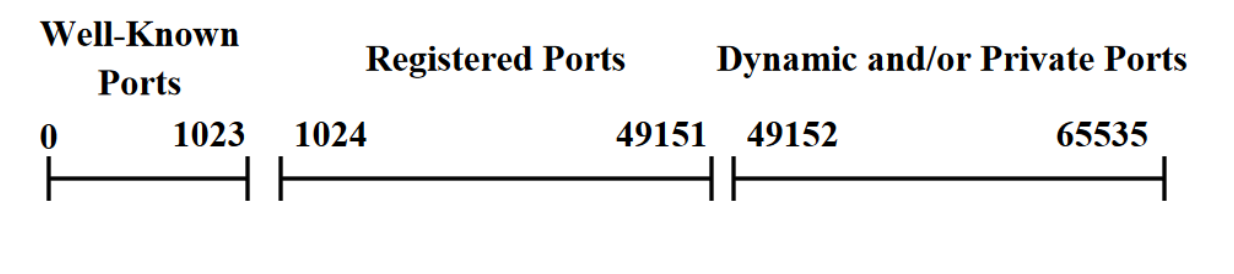
  • Well-known ports are those below 1024 and are generally used by the operating system or system processes. Application-layer programs acting as servers commonly listen on these ports. 
    Some examples are applications that use the following protocols (IANA, n.d.):
  • FTP, a file-transfer protocol used by applications such as FileZilla → port 21.
  • SSH, a protocol used to establish an encrypted remote session → port 22.
  • SMTP, a standard protocol for transmitting email → port 25.
  • HTTP, an application-layer protocol used as the main system for transmitting information on the Web → port 80.
  • HTTPS, HTTP with added security → port 443.
  • Registered ports are assigned to specific protocols, applications, or services, but they are not reserved as strictly as well-known ports.
    Registered ports are often used by less common applications and services or by new protocols that require a standardized port number without needing the widespread recognition associated with well-known ports. Custom communication protocols or less widely used applications may therefore use registered ports.
  • Dynamic or private ports are all the remaining ports and may be freely used by user applications, provided that another process is not already using them. They are generally assigned dynamically by the operating system and are not permanently reserved for specific protocols. This provides greater flexibility in allocating communication resources and helps prevent port conflicts when several applications communicate simultaneously (Cotton et al., 2011).

Example
Consider an example of a well-known port.
When you visit a website such as “www.example.com” in a browser, you implicitly communicate with the server through HTTP (Hypertext Transfer Protocol) on its default port, 80. HTTP is used to request and transfer web pages and other content across the Web.

Consider an example of a registered port.
A company wants to create a web service that adds two numbers. 
The service must receive two numbers as input and return their sum as its output.
This calculator program is made available on port 3000.
Every client that wants to use the service must connect to the server’s address and specify port 3000. Its message must contain two numbers, and it must handle a returned number representing their sum. These rules form the protocol.

Consider an example of a dynamic port.
When we open an HTTPS website, the browser connects to port 443 on the web server. The user’s computer also uses its own temporary port, selected automatically by the operating system, to identify that specific communication.
For example, the browser might communicate as follows: client: port 52341 → server: port 443.
If the user opens several tabs or services at the same time, the operating system can assign different dynamic ports to distinguish the various active communications.

Socket

When two devices communicate over a network, knowing their address and port is not enough: a mechanism is also required to manage the actual communication between the two programs. 
This mechanism is the socket.

A socket is the software endpoint through which a program communicates over a network (Gilligan et al., 2003).

  • With TCP, it can represent a connection.
  • With UDP, it represents an endpoint for sending and receiving datagrams.

A socket is the software object that allows a program to send and receive data over a network by using an address and a port:
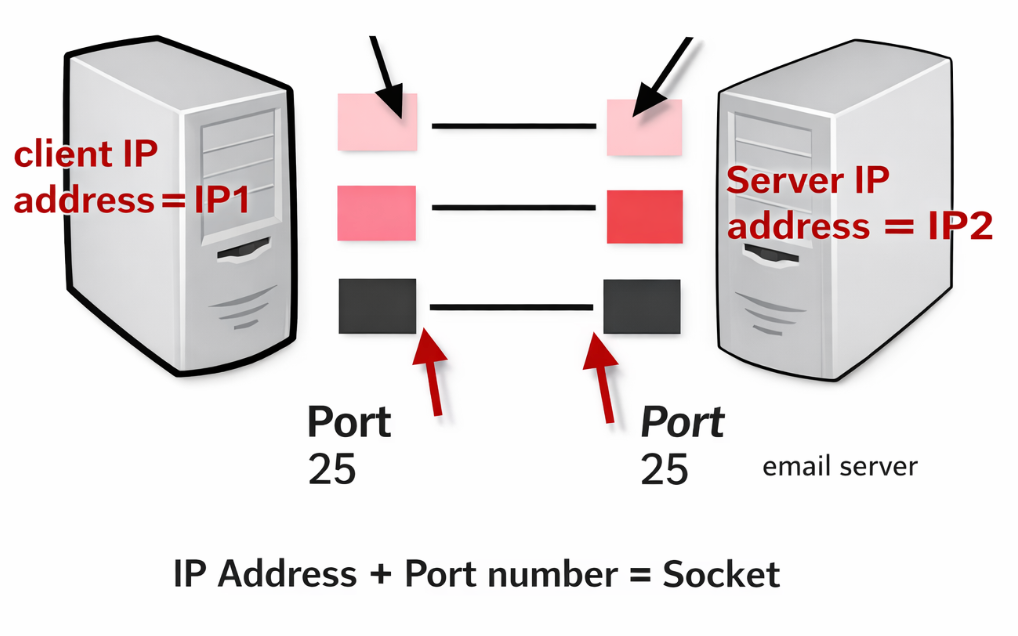
  • The address identifies the computer.
  • The port identifies the program.
  • The socket represents the communication between them.

When an application wants to communicate with another remote application, it creates a socket:

  • If it uses TCP, it establishes a connection with the server.
  • If it uses UDP, it sends datagrams to a destination address and port.

The two applications communicate by exchanging data through their respective sockets.

A local socket is identified by at least an address, a port, and a transport protocol, such as TCP or UDP (Gilligan et al., 2003).
In a TCP connection, the communication is identified more precisely by the combination of the sender’s address and port, the receiver’s address and port, and the protocol being used (Eddy, 2022).

Together, these elements allow a socket to identify a specific connection between two hosts.

The stages of socket communication are:

  • Creation: the program creates a socket and binds it to an address and a port.
  • Connection (for TCP)
  • If the host is a client, it locates the server and establishes a connection.
  • If the host is a server, it listens for incoming connections. When a client connects, the server creates a new socket for that connection, containing the client’s and server’s addresses and ports.
  • Transmission: data can be sent and received through the socket.
  • Closing: once communication has ended, the socket is closed.

Sockets are divided into two categories, each characterized by a different communication method.

  • Datagram socket (UDP socket): this type of socket uses UDP. Data is sent as small datagrams without guaranteeing their arrival order or correctness. The client and server do not establish an actual connection; instead, the client sends data directly to the server whenever necessary (Postel, 1980).
  • Stream socket (TCP socket): this type uses a TCP-based, connection-oriented communication. It provides more control and reliability but introduces more overhead than a UDP socket (Eddy, 2022).

Example
The following steps occur when a user asks a browser to open www.wikipedia.org:

  • The user enters www.wikipedia.org in the browser.
  • The system uses DNS to obtain the address of the server associated with that name.
  • The browser opens a TCP socket to port 443 to communicate with the HTTPS server, which uses secure HTTP, at the address just obtained.
  • The server responds, and data passes through the socket.
  • The browser displays the web page.
  • Once the exchange is complete, the socket is closed.

Consider a very simple socket example. 
In this example, the client sends a number to the server. The server calculates its square and returns the result to the client. 
The following application-layer client and server code uses transport-layer calls to send the messages.
The transport-layer calls are:

Client Side

  • CONNECT(address, destPort): requests a connection to a specified host, only for connection-oriented protocols such as TCP. The function returns the corresponding socket.
  • SEND(socket, data): sends data through the connection or port using TCP or UDP.
  • RECEIVE(socket): receives data from the socket using either TCP or UDP.
  • CLOSE(socket): terminates the TCP connection.

Server side

  • WAIT(localPort): waits for connection requests on the specified port, using TCP only. The function returns the corresponding socket. This function is a simplified representation of the operations through which a server listens for and accepts a connection.
  • SEND(socket, data): sends data through the connection or port using TCP or UDP.
  • RECEIVE(socket): receives data from the socket using either TCP or UDP.
  • CLOSE(socket): closes the connection or port.

Sotto si vedono le socket rispettivamente del client e del server.

Client Socket

serverAddress = "127.0.0.1"
serverPort = 65432
number = 5

socket = CONNECT(serverAddress, serverPort)
SEND(socket, number)
result = RECEIVE(socket)
CLOSE(socket)

Socket Server

serverPort = 65432

LOOP: # when the server completes an operation, it starts listening again
     socket = WAIT(serverPort)
     dato = RECEIVE(socket)

     result = data * data
     SEND(socket, result)
     CLOSE(socket)

Key points

  • The transport layer logically connects application processes running on different hosts.
  • The main transport protocols are TCP, UDP, and QUIC.
  • TCP is connection-oriented and reliable: it manages errors, data ordering, flow control, and congestion control.
  • TCP divides data into segments and retransmits any segments that are lost or damaged.
  • UDP is connectionless and unreliable, but it is faster and introduces less overhead.
  • UDP uses data units called datagrams and is suitable for streaming, online gaming, VoIP, and real-time applications.
  • QUIC runs over UDP but adds reliability, congestion control, and security through TLS.
  • QUIC reduces connection-establishment time, handles network changes more effectively, and supports multiple independent streams. It forms the foundation of HTTP/3.
  • A port is a logical number that identifies an application or service within a host.
  • Ports can be well-known, registered, or dynamic/private.
  • A socket is the software endpoint through which an application sends and receives data using an address, a port, and a protocol.
  • Stream sockets use TCP, while datagram sockets use UDP.

Download the lesson PDF

  • Allman, M., Paxson, V., & Blanton, E. (2009). TCP congestion control (RFC 5681). RFC Editor. https://doi.org/10.17487/RFC568
  • Bishop, M. (2022). HTTP/3 (RFC 9114). RFC Editor. https://doi.org/10.17487/RFC9114
  • Cotton, M., Eggert, L., Touch, J., Westerlund, M., & Cheshire, S. (2011). Internet Assigned Numbers Authority (IANA) procedures for the management of the service name and transport protocol port number registry (RFC 6335). RFC Editor. https://doi.org/10.17487/RFC6335
  • Eddy, W. (Ed.). (2022). Transmission Control Protocol (TCP) (RFC 9293). RFC Editor. https://doi.org/10.17487/RFC9293
  • Eggert, L., Fairhurst, G., & Shepherd, G. (2017). UDP usage guidelines (RFC 8085). RFC Editor. https://doi.org/10.17487/RFC8085
  • Gilligan, R., Thomson, S., Bound, J., McCann, J., & Stevens, W. (2003). Basic socket interface extensions for IPv6 (RFC 3493). RFC Editor. https://doi.org/10.17487/RFC3493
  • Internet Assigned Numbers Authority. (n.d.). Service name and transport protocol port number registry. Retrieved August 17, 2026, from https://www.iana.org/assignments/service-names-port-numbers/service-names-port-numbers.xhtml
  • Iyengar, J., & Thomson, M. (Eds.). (2021). QUIC: A UDP-based multiplexed and secure transport (RFC 9000). RFC Editor. https://doi.org/10.17487/RFC9000
  • Postel, J. (1980). User Datagram Protocol (RFC 768). RFC Editor. https://doi.org/10.17487/RFC768
  • Thomson, M., & Turner, S. (Eds.). (2021). Using TLS to secure QUIC (RFC 9001). RFC Editor. https://doi.org/10.17487/RFC9001
  • James F. Kurose and Keith W. Ross, Computer Networking: A Top-Down Approach, 9th ed., Pearson, 2026 — Provides a comprehensive treatment of the transport layer, including UDP, TCP, reliable data transfer, multiplexing and demultiplexing, flow control, connection management, congestion control, and modern protocols such as QUIC and HTTP/3.
  • Andrew S. Tanenbaum, Nick Feamster, and David J. Wetherall, Computer Networks, 6th ed., Pearson, 2022 — Offers a systematic explanation of transport services and protocols, covering connection establishment and termination, ports, TCP, UDP, flow control, congestion control, performance, and the role of sockets in communication between applications.
  • Behrouz A. Forouzan, Data Communications and Networking with TCP/IP Protocol Suite, 6th ed., McGraw Hill, 2022 — Dedicates an entire chapter to the transport layer and places TCP and UDP within the complete TCP/IP architecture, making it useful for understanding how end-to-end communication, port numbers, reliability, and transport services interact with the surrounding layers.
  • Kevin R. Fall and W. Richard Stevens, TCP/IP Illustrated, Volume 1: The Protocols, 2nd ed., Addison-Wesley Professional, 2012 — Provides a detailed examination of TCP/IP protocols and is especially useful for exploring TCP segments, sequence and acknowledgment numbers, retransmissions, connection establishment and termination, timers, flow control, congestion control, and UDP behavior at a deeper technical level.
  • W. Richard Stevens, Bill Fenner, and Andrew M. Rudoff, UNIX Network Programming, Volume 1: The Sockets Networking API, 3rd ed., Addison-Wesley Professional, 2004 — Provides an in-depth practical treatment of network programming through sockets, covering TCP and UDP, port numbers, client-server communication, connection establishment, stream and datagram sockets, and the programming interfaces used by applications to access transport-layer services.

TCP or UDP?

A software company is developing three applications:

  • A service for uploading important files to a server.
  • A multiplayer video game in which players’ positions must be updated quickly.
  • A real-time videoconferencing system.

For each application:

  • Choose whether to use mainly TCP or UDP.
  • Justify your choice by considering reliability, latency, and overhead.
  • Explain what co uld happen if a packet were lost.
  • Indicate in which cases retransmitting lost data would be important and in which cases it might be preferable to continue the communication.
  • Explain why UDP can be advantageous even though it does not guarantee delivery.
  • Explain why TCP may be more suitable when data integrity is more important than delivery speed.

A TCP Segment Is Lost

A client is transferring a document using TCP.
The application message is divided into five segments:1 – 2 – 3 – 4 – 5
During transmission, segment 3 is lost, while the others correctly reach the destination.

Analyze what must happen.

  • Explain the function of sequence numbers.
  • Explain how the receiver can detect that part of the data is missing.
  • Indicate the role of acknowledgments.
  • Describe what TCP must do to recover the missing segment.
  • Explain why the receiver must reassemble the segments in the correct order.
  • Explain what would be different if the same communication used UDP.
  • During the transfer, the receiver also begins to process the data more slowly.
  • Explain which TCP function prevents the sender from continuing to transmit data too quickly.
  • If instead the network itself becomes congested, indicate which other TCP mechanism comes into play.

Opening and Closing a TCP Connection

A browser needs to communicate with a server using TCP.
The communication goes through the following phases:
SYN → SYN-ACK → ACK → data transfer → FIN

Answer the following questions:

  • Explain what the client is requesting when it sends SYN.
  • Explain what the server communicates through SYN-ACK.
  • Indicate the function of the client’s subsequent ACK.
  • Determine at what point the connection can be considered established.
  • Explain what happens during the data transfer phase.
  • Explain the meaning of FIN.
  • Indicate in which situation an RST might appear instead.
  • Explain why this procedure makes TCP a connection-oriented protocol, while UDP does not require an equivalent phase.

Why Do Ports Exist?

A computer is performing the following activities at the same time:

  • A browser is visiting an HTTPS website.
  • A program is sending an email via SMTP.
  • Another program opens an SSH session.
  • A second browser simultaneously opens another HTTPS website.

All communications use the same computer and therefore the same network address.
Answer the following questions:

  • Explain why the computer’s address is not sufficient to distinguish all the communications.
  • Indicate the function of ports.
  • Match the listed services with the well-known ports mentioned in the learning material: SSH, SMTP, and HTTPS.
  • Explain the difference between a source port and a destination port.

IThe first browser communicates as follows: Client: port 52341 → Server: port 443.

  • Explain the meaning of the two numbers.
  • A second browser opens another HTTPS connection. Explain why the operating system can assign it a different source port.
  • In this context, explain the difference between well-known ports, registered ports, and dynamic/private ports.

Why QUIC?

A smartphone is loading a modern web page made up of text, images, scripts, and video.
During browsing, two things happen:

  • One of the resources experiences a delay.
  • The smartphone switches from Wi-Fi to the mobile network.

Compare the use of traditional TCP-based communication with QUIC-based communication.

  • Explain why QUIC uses UDP as its foundation while still providing reliability features.
  • Indicate which features normally associated with TCP are added by QUIC.
  • Explain why QUIC can reduce the time required to start a secure communication.
  • Explain the advantage provided by integrated TLS security.
  • Describe why switching from Wi-Fi to the mobile network can cause problems for a traditional TCP connection.
  • Explain why QUIC can handle this change more effectively.
  • One resource on the page experiences data loss. Explain why managing multiple independent streams can prevent the problem from unnecessarily slowing down the other resources as well.
  • Explain why these characteristics make QUIC particularly suitable for HTTP/3 and the modern Web.

Designing a Service with Sockets

You need to create a simple client-server service.
The client sends an integer to the server. The server calculates twice the received number and returns the result.
Use the abstract operations described in the learning material:
CONNECT – WAIT – SEND – RECEIVE – CLOSE

Conceptually complete the operation of the system.

  • Write the sequence of operations that the client should perform.
  • Write the sequence of operations that the server should perform.
  • Explain the function of WAIT(serverPort) on the server.
  • Explain what CONNECT(address, port) conceptually returns.
  • Indicate which software object the client and server use to send and receive data.
  • Explain why a socket is not simply the same thing as a port.
  • Describe which information identifies at least a local socket.
  • If the system uses TCP, indicate which type of socket is used.
  • Explain what would conceptually change if a UDP Datagram Socket were used instead of a TCP Stream Socket.
  • The server must continue serving new clients after completing a request. Explain why, after CLOSE(socket), it must return to listening on its port.

To create these materials, I used generative artificial intelligence tools to support the writing process, particularly to improve the wording and style of the text, reorganize content, refine phrasing, and speed up certain editorial tasks.
Since I work independently on the production of these materials, I try to automate all activities that can reasonably be automated, so that I can devote more time to research, design, and content development.

However, artificial intelligence does not determine the content of the work: the selection of topics, structure, ideas, interpretations, examples, and teaching approach are developed by me. AI is therefore used primarily as a tool to support production and formal revision, while authorship and responsibility for the design and development of the content remain mine.

Unless otherwise stated, this material is licensed under the Creative Commons Attribution–NonCommercial–ShareAlike 4.0 International License (CC BY-NC-SA 4.0).

You are therefore free to share, redistribute, adapt, and create derivative works based on this material, provided that proper attribution is given, the material is not used for commercial purposes, and any modified or derivative versions are distributed under the same license.

Do you want to help me write articles like this one?


Leave a Reply

Your email address will not be published. Required fields are marked *

No responses yet

Sostieni il progetto

Tutti i materiali che condivido nascono da una convinzione molto semplice: una buona formazione non dovrebbe limitarsi a insegnare quali pulsanti premere, ma aiutare a comprendere le idee, i principi e i processi che stanno dietro agli strumenti.

Per questo dedico una parte significativa del mio tempo a studiare, organizzare e produrre contenuti gratuiti dedicati al multimedia, al design e alla comunicazione visiva. Articoli, lezioni, approfondimenti e risorse che hanno l’obiettivo di rendere accessibili argomenti spesso affrontati in modo frammentario o superficiale.

Questo lavoro richiede però tempo, ricerca e cura. Ogni guida, ogni video, ogni materiale pubblicato gratuitamente è il risultato di molte ore di studio, scrittura e revisione.
Sostenere il progetto attraverso Patreon significa permettermi di continuare a produrre contenuti educativi di qualità, mantenerli accessibili al maggior numero possibile di persone e dedicare più energie alla costruzione di una risorsa che possa essere utile a studenti, professionisti e appassionati.

Se credi che una conoscenza più profonda, rigorosa e consapevole del multimedia abbia valore, il tuo contributo non sostiene soltanto il mio lavoro: aiuta a rendere queste risorse disponibili per tutta la comunità.
Grazie per il supporto e per la fiducia.

Patreon è troppo impegnativo?

Puoi sostenermi anche con una donazione libera, senza abbonamento e senza impegno.
Anche un piccolo contributo mi aiuta a continuare a creare giochi, contenuti didattici e materiali gratuiti con più libertà.

Support the project

All the materials I share stem from a very simple conviction: good training should not be limited to teaching which buttons to press, but should help people understand the ideas, principles, and processes behind the tools.

That is why I dedicate a significant portion of my time to researching, organizing, and producing free content focused on multimedia, design, and visual communication—articles, lessons, in-depth analyses, and resources aimed at making accessible topics that are often addressed in a fragmented or superficial way.

However, this work requires time, research, and care. Every guide, video, and piece of material published for free is the result of many hours of study, writing, and revision.
Supporting the project via Patreon enables me to continue producing high-quality educational content, keep it accessible to as many people as possible, and devote more energy to building a resource that benefits students, professionals, and enthusiasts alike.

If you believe that a deeper, more rigorous, and informed understanding of multimedia is valuable, your contribution does more than just support my work: it helps make these resources available to the entire community.
Thank you for your support and trust.

Is Patreon too demanding?

You can also support me with a voluntary donation—no subscription or commitment required.

Even a small contribution helps me continue creating games, educational content, and free materials with greater freedom.