
Application layer, DNS, and domain names

The application layer, DNS, and domain names are the core concepts of this lesson, which focuses on the network architecture layer enabling programs and applications to communicate over the Internet.

The text introduces key application protocols—such as HTTP, SMTP, and FTP—and examines the workings of DNS, the system that translates human-readable domain names into the numerical addresses used by devices.
The lesson then explains the hierarchical structure of domains, distinguishing between TLDs, second-level domains, subdomains, and FQDNs.

Application layer

The application layer manages communications between the programs or applications running on users’ computers and the network itself. 
This layer provides high-level services to applications, allowing them to communicate, exchange data, and interact with other applications across different networks.
At this layer, packets are called messages.

Some common protocols and services associated with the application layer include:

  • HTTP (Hypertext Transfer Protocol) for the World Wide Web (Fielding et al., 2022).
  • SMTP (Simple Mail Transfer Protocol) for sending email (Klensin, 2008).
  • FTP (File Transfer Protocol) for transferring files (Postel & Reynolds, 1985).

Domain

A very important application-layer service is the Domain Name System (DNS), which translates domain names into the addresses of hosts connected to the network (Mockapetris, 1987).
A domain is a unique, human-readable name used to identify and access online resources such as websites, email servers, online services, and more.
Domain names are read from right to left and consist of strings separated by dots.
Domains are mainly used to simplify access to Internet resources. Instead of remembering a sequence of numbers that identifies a server, users can enter a more meaningful domain name in a browser or application. 
DNS therefore translates a domain name into a numerical address, allowing the network device to locate the corresponding host.

The DNS service is implemented through a globally distributed database made up of DNS servers Mockapetris, 1987).
DNS is similar to a phone’s contact list: when the number of
Mario Rossi is stored, there is no need to type his phone number; instead, you search the
contact list for the name Mario Rossi. 
In the same way, the DNS service converts the domain
name (for example, esempio.it) into a number (for example, 190.12.13.54), which corresponds to the actual address of a specific host on the network. In the following chapters, we will see that this actual address is the IP address.
As soon as the user enters an address in the browser, the DNS server searches
its records for the corresponding numerical address. 
If the address is not found, the DNS server forwards the request to another server that is more likely to have the required information. This process continues until an answer is found or it is confirmed that the name does not exist (Mockapetris, 1987).
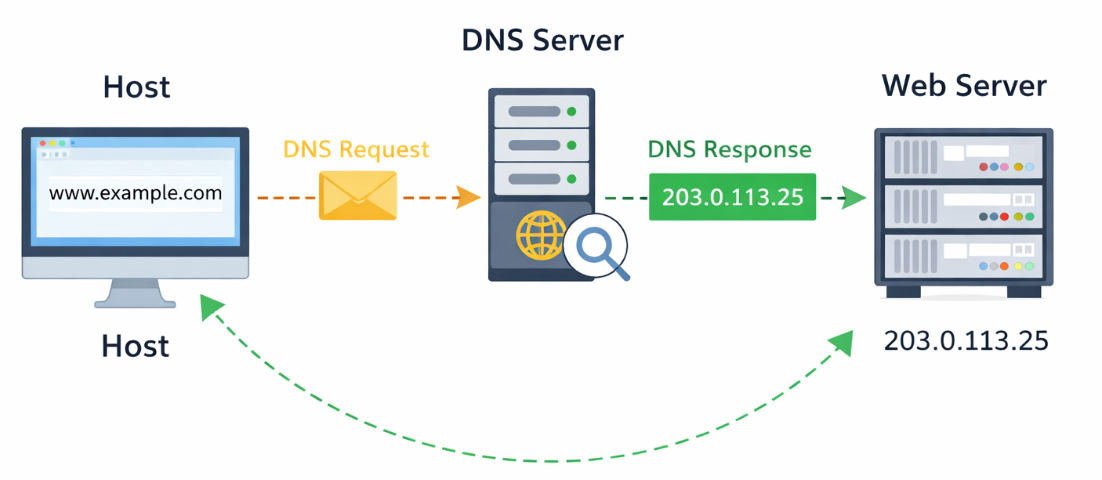
A nameserver is an authoritative DNS server, meaning a server that directly stores the official information for one or more domainsi (Hoffman & Fujiwara, 2024).

Example
Suppose a user wants to access the web address “www.example.com.” 
The user’s device sends a DNS request to a DNS server to obtain the actual address associated with this domain name.

  • DNS request: the user enters “www.example.com” to start the address-resolution process.
  • Sending the request: the device sends the DNS request to the local DNS server or to the server configured by the ISP.
  • Receiving DNS server: the DNS server receives the request and searches its database for the address associated with the domain name “www.example.com.”
  • DNS server response: the DNS server replies with the address corresponding to the requested domain name.
  • Receiving the response: the device receives the numerical address from the DNS query.
  • Connecting to the web server: now that the device has the actual address, it can use it to establish a connection with the web server associated with the domain name “www.example.com.”

The same domain name can be associated with multiple addresses.
This possibility can be used to:

  • Distribute traffic across multiple servers, preventing all requests from reaching a single machine.
  • Improve service continuity because, if one address is unreachable, the client can try another.
  • Direct users toward infrastructure considered closer or more suitable.

When the client receives multiple addresses, it orders them according to specific criteria and attempts to establish a connection with one of them. If an attempt fails or takes too long, it can try another address.
Modern clients can start slightly staggered connection attempts toward different addresses and use whichever connection is established first. 
This mechanism reduces waiting times when an address or network protocol is unreachable or particularly slow (Schinazi & Pauly, 2017).

Domain Hierarchy

A fully qualified domain name (FQDN) is a domain name specified in full, including every label in the DNS hierarchy, with no parts omitted (Hoffman & Fujiwara, 2024).
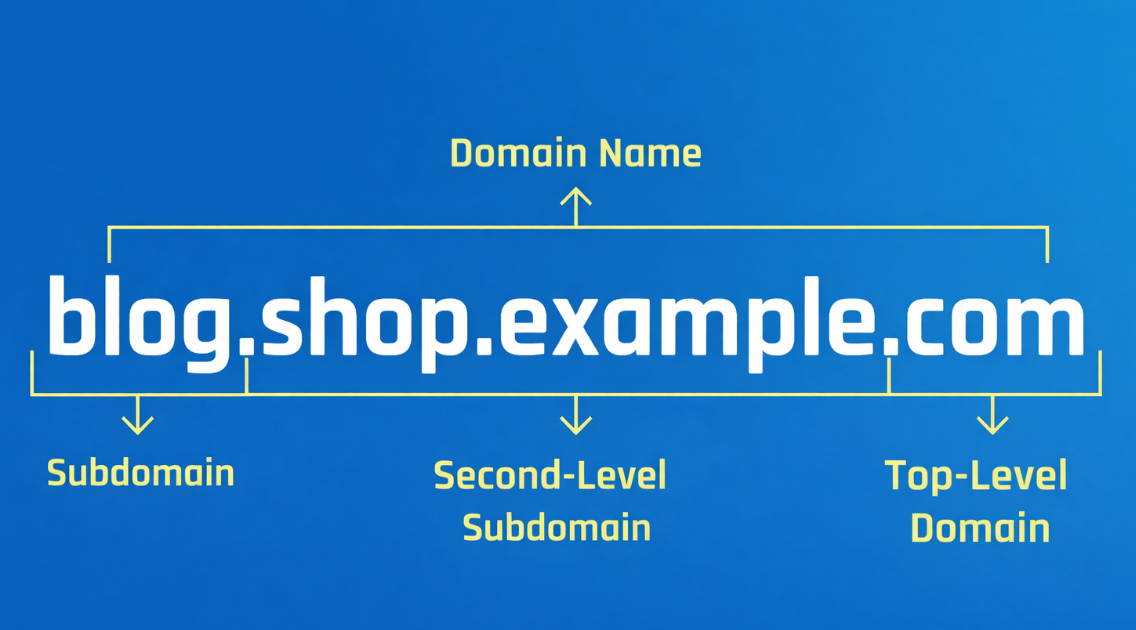
An FQDN is therefore an absolute name that identifies a resource precisely within DNS, all the way to the root.

A domain name is hierarchically organized into levels, read from right to left and separated by dots  (Hoffman & Fujiwara, 2024).
The three main levels are:

  • Top-level domain.
  • Second-level domain.
  • Subdomain.

Note:  
A final dot (.) sometimes appears on the right. It represents the DNS root and makes the name complete and absolute. Without this dot, the name may be interpreted as relative in certain contexts (Hoffman & Fujiwara, 2024).

Top-Level Domain

In a domain name, the most important part is the first one from the right. 
This is called the top-level domain, or TLD, for example “.org” or “.it.”
TLDs are managed and assigned by ICANN (Internet Corporation for Assigned Names and Numbers), the organization responsible for coordinating unique identification systems on the Internet (Internet Assigned Numbers Authority, n.d.).

There are two main types of TLDs:

  • Generic.
  • Country-code

Generic TLD
These TLDs are generally associated with broad categories rather than specific geographical locations. 
Examples of generic TLDs include:

  • “.com” (commercial): originally intended for commercial purposes, it is now widely used without specific restrictions.
  • “.org” (organization): originally intended for nonprofit organizations, it is now used by a wide variety of entities.
  • “.net” (network): originally intended for network infrastructure, meaning the physical and logical entities that provide, manage, maintain, and interconnect the network’s core architecture, it is now used by many types of entities.

Country-Code TLD
These TLDs are associated with specific geographical locations or countries. Each country has its own TLD representing the domain’s geographical identity. Examples of country-code TLDs include:

  • “.us” (United States).
  • “.uk” (United Kingdom).
  • “.fr” (France).
  • “.de” (Germany).
  • “.jp” (Japan).

Second-Level Domain

A second-level domain (SLD), often simply called the domain name, is the part of a domain name located immediately to the left of the top-level domain (TLD).
The domain name is the name chosen for a website, service, or online resource, following the format “SLD.TLD.” (Hoffman & Fujiwara, 2024). 
For example, consider the domain “example.com”:

  • “example” is the second-level domain (SLD).
  • “com” is the top-level domain (TLD).

The second-level domain is what makes a domain name unique compared with others. 
It is the customizable and identifying part of the web address. 
It can consist of words or terms that reflect a brand, business activity, website content, or anything else the host wants to communicate.

The second-level domain and the top-level domain form the root domain or main domain, meaning the complete domain name without subdomains.

Subdomain

A subdomain is the part of a domain name located to the left of the second-level domain (Hoffman & Fujiwara, 2024).
Subdomains are mainly used to provide additional context, structure, and organization within the domain-name architecture. 
A subdomain can itself consist of multiple levels, such as fourth-level, fifth-level, and so on.

Example
In the domain “materials.students.academy.us”:

  • “us” is the top-level domain.
  • “academy” is the second-level domain.
  • In the name materials.students.academy.us both materials and students are additional levels to the left of the main domain academy.us. In this case, the subdomains are organized into multiple levels. More specifically:
  • “students” is a third-level domain.
  • “materials” is a fourth-level domain.

In many cases, the leftmost part of the name may identify a specific host or service, such as www, mail, files, or db. 
Examples include:

  • Web server: “www” is often used to identify a web server that hosts a domain’s web page.
  • Mail server: “mail” may be used to identify an email server.
  • File server: “files” may be used to identify a file or storage server.
  • Application server: “app” may be used to identify a server that hosts a specific application.
  • Database server: “db” may be used to identify a database server.
  • Game Server: “game” could be used to identify an online game server.

Example
The domain email.example.com indicates that the host we are connecting to provides the email service.
www.example.com indicates that the host we are connecting to serves a web page.

Registrar

A domain registrar is an organization or company authorized to facilitate the registration of Internet domain names  (ICANN, 2023). 
It acts as an intermediary between end users and domain-registration authorities. 
The registrar provides domain registration, management, and renewal services, allowing users to establish an online identity through domain names.
To register a second-level domain, the user must request the service from a registrar.
Some key aspects of domain registrars are:

  • Authorization: domain registrars must be accredited by top-level-domain registration authorities or national registries. This authorization ensures that the registrar complies with specific standards and regulations.
  • Domain selection: registrars allow users to search for and choose available domain names, including second-level domains under different top-level domains.
  • Registration: registrars allow users to register domain names by collecting the required information and managing the registration process through the relevant top-level-domain authority.

It is important to clarify that domain names are not sold; they are granted for temporary use.
When a user “buys” a domain, they are actually entering into a rental agreement: they obtain the exclusive right to use that name for a limited period, usually one or more years. 
When the registration expires, the domain must be renewed. Otherwise, the right to use it ends and the name becomes available to other users. The registrar therefore does not sell property but manages a temporary right of use, while ultimate control of the domain remains within the global DNS governance system (ICANN, 2023).

Registry

After clarifying the registrar’s role, we must introduce the other key participant in the domain-name system: the registry.
A registry is the organization that officially manages a top-level domain (TLD), such as .it, .com, .org, .net, or .edu. (ICANN, n.d.).
While the registrar is the intermediary that interacts with the end user, the registry is the technical and administrative authority that maintains and governs the domain extension.

In simple terms:

  • The registrar provides the service to the user.
  • The registry manages the domain’s infrastructure and rules.

The registry has three main responsibilities.

The first responsibility is to maintain the database of all domain names registered under a specific TLD
.
This database contains essential information such as:

  • Which domains are registered.
  • Their status, such as active, expired, or locked.
  • The nameservers associated with each domain.

The second responsibility is to manage the TLD’s nameservers.
When a DNS service needs to resolve a name such as www.example.it, it first queries the root servers and is then directed to the TLD servers, in this case the “.it” servers.
These servers are managed by the registry and respond by identifying the authoritative nameservers for the requested domain (ICANN, n.d.).

The third responsibility is to define and enforce the domain’s rules.
Each TLD has its own policies defining who can register it, for how long, under what restrictions, and which renewal, transfer, or revocation procedures apply.
For example:

  • Some TLDs require specific conditions, such as residency or a particular type of organization.
  • Others are open to anyone.
  • Expiration and recovery periods may vary.

The registry does not sell domains directly to end users.
Instead, it operates through a network of accredited registrars authorized to interact with its database using standardized protocols.
When a user registers, renews, or transfers a domain:

  • The user communicates with the registrar.
  • The registrar sends the operations to the registry.
  • The registry updates the TLD’s official database.

In this model, the registry ensures global consistency, uniqueness, and reliability, while the registrar provides the commercial and operational interface for the user (ICANN, n.d.).

Key points

  • The application layer allows applications to communicate over a network.
  • At this layer, data is called messages.
  • Some application-layer protocols are HTTP, SMTP, and FTP.
  • The Domain Name System (DNS) translates domain names into the numerical addresses of hosts.
  • DNS is a distributed system made up of DNS servers; authoritative name servers store the official information for domains.
  • A domain name is organized hierarchically and is read from right to left.
  • A complete domain name, called a Fully Qualified Domain Name (FQDN), precisely identifies a resource within the DNS.
  • The Top-Level Domain (TLD) is the highest domain level, such as .it or .com; the second-level domain is the customizable part.
  • Subdomains organize services or sections, such as mail.example.com.
  • The same domain can be associated with multiple addresses to distribute traffic and increase reliability.
  • A registrar registers and manages domain names on behalf of users.
  • A registry officially manages a TLD, including its database, name servers, and registration rules.
  • A domain name is not purchased permanently but registered for a renewable period.

Download the lesson PDF

  • Fielding, R., Nottingham, M., & Reschke, J. (2022). HTTP semantics (RFC 9110). RFC Editor. https://doi.org/10.17487/RFC9110
  • Hoffman, P., & Fujiwara, K. (2024). DNS terminology (RFC 9499). RFC Editor. https://doi.org/10.17487/RFC9499
  • ICANN. (n.d.). Registry operator (RO). https://www.icann.org/en/icann-acronyms-and-terms/registry-operator-en
  • ICANN. (2023, November 2). The domain name registration process. https://www.icann.org/resources/pages/domain-name-registration-process-2023-11-02-en
  • Internet Assigned Numbers Authority. (n.d.). Root zone management. https://www.iana.org/domains/root
  • Klensin, J. (2008). Simple mail transfer protocol (RFC 5321). RFC Editor. https://doi.org/10.17487/RFC5321
  • Mockapetris, P. (1987). Domain names—Concepts and facilities (RFC 1034). RFC Editor. https://doi.org/10.17487/RFC1034
  • Postel, J., & Reynolds, J. (1985). File transfer protocol (RFC 959). RFC Editor. https://doi.org/10.17487/RFC0959
  • Schinazi, D., & Pauly, T. (2017). Happy Eyeballs version 2: Better connectivity using concurrency (RFC 8305). RFC Editor. https://doi.org/10.17487/RFC8305
  • James F. Kurose and Keith W. Ross, Computer Networking: A Top-Down Approach, 9th ed., Pearson, 2026 — Provides a particularly clear introduction to the application layer, with dedicated coverage of HTTP, electronic mail and SMTP, DNS, domain-name resolution, DNS records and messages, web applications, and the relationship between application protocols and the underlying network.
  • Andrew S. Tanenbaum, Nick Feamster, and David J. Wetherall, Computer Networks, 6th ed., Pearson, 2022 — Offers a systematic treatment of application-layer services, including the Domain Name System, electronic mail, the World Wide Web, HTTP, streaming services, and content distribution, placing DNS and web protocols within the broader architecture of computer networks.
  • Cricket Liu and Paul Albitz, DNS and BIND, 5th ed., O’Reilly Media, 2006 — Provides an in-depth treatment of the Domain Name System, including the DNS namespace, domain hierarchy, top-level domains, resource records, authoritative name servers, resolvers, recursive and iterative resolution, caching, delegation, subdomains, registrars, registries, and DNS administration.
  • Mark E. Jeftovic, Managing Mission-Critical Domains and DNS: Demystifying Nameservers, DNS, and Domain Names, Packt, 2018 — Focuses on the practical management of domains and DNS infrastructure, explaining domain names, DNS queries, name servers, operational risks, and the administration of naming systems used by organizations and online services.
  • Stephen Ludin and Javier Garza, Learning HTTP/2, O’Reilly Media, 2017 — Provides a more specialized exploration of HTTP and web communication, explaining the evolution from HTTP/1.1 to HTTP/2, request and response behavior, web performance, connections, protocol framing, and the technologies that support modern web applications.

From the Website Name to the Server

A user types the following into the browser: www.example.com
The browser needs to reach the correct server, but the computer does not yet know its numerical address.

Answer the following questions:

  • Explain why the domain name alone is not sufficient to directly reach the host.
  • Identify which application-layer service is used to solve this problem.
  • Reconstruct the process DNS request → lookup → DNS response → connection to the web server.
  • Explain the function performed by the local DNS server or the DNS server configured by the ISP.
  • Explain what may happen if the DNS server being queried does not directly have the requested information.
  • Explain the role of an authoritative nameserver.
  • Imagine that the name www.example.com is associated with three different addresses. Explain why this configuration can improve traffic distribution and service availability.
  • If the first address returned by DNS is unreachable, explain what behavior the client may adopt.

Reading a Domain Name Correctly

Consider the following name: 
materials.students.academy.us

Analyze it using the DNS hierarchy described in the learning material.

  • Identify the top-level domain.
  • Identify the second-level domain.
  • Identify the main domain, or root domain.
  • Identify the levels that make up the subdomains.
  • Explain why studenti and materiali do not play the same role as accademia and it.
  • Indicate which of the two subdomains is located deeper in the hierarchy.
  • Explain why domain names must be read hierarchically from right to left.
  • Imagine that you want to create separate services for a website, email, database, and file storage. Propose four consistent names using prefixes such as www, mail, db, and files.
  • Explain how the leftmost part can be used to identify a specific host or service.

Registering a New Domain

A new association wants to use the domain: futureproject.org

The person in charge believes that it is enough to “buy the domain from the Internet” and that, once paid for, the name becomes the association’s permanent property.

Analyze the situation.

  • Identify which part of the name is the TLD and which is the second-level domain.
  • Explain whether .org is a generic or country-code TLD.
  • Identify which organization the association would normally contact to register the domain.
  • Explain the function performed by the registrar.
  • Explain why describing domain registration as a “permanent purchase” is inaccurate according to the learning material.
  • Describe what may happen if the domain is not renewed when it expires.
  • Explain the function performed by the registry of the .org TLD.
  • Reconstruct the registration process: user → registrar → registry → update of the TLD database.
  • Explain why the registrar and the registry are not the same thing, even though they work together in domain management.

Designing the Names of an Online Service

A company owns the domain: creativecloud.it

It wants to organize several services:

  • The public website.
  • The email service.
  • A file archive.
  • A web application.
  • An internal database.

Design a possible naming structure.

  • Propose a fully qualified domain name for each service.
  • For each name, identify the TLD, second-level domain, and subdomain.
  • Explain why using different subdomains can help organize services.
  • Explain how names such as mail.creativecloud.it or files.creativecloud.it can communicate the function of the service to the user.
  • Imagine that www.creativecloud.it is associated with multiple numerical addresses. Explain what advantages the company could gain.
  • Explain what DNS should do when a user tries to reach app.creativecloud.it.
  • Identify which application protocol could be associated with the website, which with email, and which with file transfer, using only the protocols mentioned in the learning material.
  • Finally, explain why DNS, HTTP, SMTP, and FTP all belong to the application layer even though they perform different functions.

To create these materials, I used generative artificial intelligence tools to support the writing process, particularly to improve the wording and style of the text, reorganize content, refine phrasing, and speed up certain editorial tasks.
Since I work independently on the production of these materials, I try to automate all activities that can reasonably be automated, so that I can devote more time to research, design, and content development.

However, artificial intelligence does not determine the content of the work: the selection of topics, structure, ideas, interpretations, examples, and teaching approach are developed by me. AI is therefore used primarily as a tool to support production and formal revision, while authorship and responsibility for the design and development of the content remain mine.

Unless otherwise stated, this material is licensed under the Creative Commons Attribution–NonCommercial–ShareAlike 4.0 International License (CC BY-NC-SA 4.0).

You are therefore free to share, redistribute, adapt, and create derivative works based on this material, provided that proper attribution is given, the material is not used for commercial purposes, and any modified or derivative versions are distributed under the same license.

Do you want to help me write articles like this one?


Leave a Reply

Your email address will not be published. Required fields are marked *

No responses yet

Sostieni il progetto

Tutti i materiali che condivido nascono da una convinzione molto semplice: una buona formazione non dovrebbe limitarsi a insegnare quali pulsanti premere, ma aiutare a comprendere le idee, i principi e i processi che stanno dietro agli strumenti.

Per questo dedico una parte significativa del mio tempo a studiare, organizzare e produrre contenuti gratuiti dedicati al multimedia, al design e alla comunicazione visiva. Articoli, lezioni, approfondimenti e risorse che hanno l’obiettivo di rendere accessibili argomenti spesso affrontati in modo frammentario o superficiale.

Questo lavoro richiede però tempo, ricerca e cura. Ogni guida, ogni video, ogni materiale pubblicato gratuitamente è il risultato di molte ore di studio, scrittura e revisione.
Sostenere il progetto attraverso Patreon significa permettermi di continuare a produrre contenuti educativi di qualità, mantenerli accessibili al maggior numero possibile di persone e dedicare più energie alla costruzione di una risorsa che possa essere utile a studenti, professionisti e appassionati.

Se credi che una conoscenza più profonda, rigorosa e consapevole del multimedia abbia valore, il tuo contributo non sostiene soltanto il mio lavoro: aiuta a rendere queste risorse disponibili per tutta la comunità.
Grazie per il supporto e per la fiducia.

Patreon è troppo impegnativo?

Puoi sostenermi anche con una donazione libera, senza abbonamento e senza impegno.
Anche un piccolo contributo mi aiuta a continuare a creare giochi, contenuti didattici e materiali gratuiti con più libertà.

Support the project

All the materials I share stem from a very simple conviction: good training should not be limited to teaching which buttons to press, but should help people understand the ideas, principles, and processes behind the tools.

That is why I dedicate a significant portion of my time to researching, organizing, and producing free content focused on multimedia, design, and visual communication—articles, lessons, in-depth analyses, and resources aimed at making accessible topics that are often addressed in a fragmented or superficial way.

However, this work requires time, research, and care. Every guide, video, and piece of material published for free is the result of many hours of study, writing, and revision.
Supporting the project via Patreon enables me to continue producing high-quality educational content, keep it accessible to as many people as possible, and devote more energy to building a resource that benefits students, professionals, and enthusiasts alike.

If you believe that a deeper, more rigorous, and informed understanding of multimedia is valuable, your contribution does more than just support my work: it helps make these resources available to the entire community.
Thank you for your support and trust.

Is Patreon too demanding?

You can also support me with a voluntary donation—no subscription or commitment required.

Even a small contribution helps me continue creating games, educational content, and free materials with greater freedom.