


The network layer, IP addresses, and routing are the core concepts of this lesson, which focuses on the network layer’s role in addressing and routing packets between different hosts and networks.
The text describes the operation of the IP protocol—a connectionless, “best-effort” protocol that attempts to deliver packets without guaranteeing reliability, ordering, or delivery timing. The lesson then clarifies the distinction between MAC addresses and IP addresses, differentiating local communication from global routing.
It goes on to cover IPv4 and IPv6 addresses, static versus dynamic addressing, public versus private addresses, the role of DHCP, and the operation of NAT/PAT, which allows multiple devices on a LAN to share a single public IP address.
The final section explains routing—the process by which routers use routing tables to determine packet paths—and forwarding, which is the actual act of sending the packet to the correct interface.
Network layer
After examining the transport layer, we can move down to the network layer. The transport layer handles logical communication between application processes, while the network layer addresses and routes packets between hosts and different networks along the most appropriate network path (Baker, 1995; Postel, 1981).
It is important to note that, in its primary operation, a router mainly uses the first three layers of the network stack: the physical, link, and network layers.
This is because the router does not need to interpret the application content of the communication, such as a web page, an email, or a file. Its task is more limited: it receives a packet through a network interface, reads the network-layer information—particularly the destination address—and decides through which interface to forward it.
To perform this task, the router needs:
The upper layers—transport and application—are mainly required on end hosts, because this is where communicating programs such as browsers, web servers, messaging apps, and email clients run.
Note: some modern routers can also inspect higher-layer information, such as ports and application protocols, for security and management purposes.
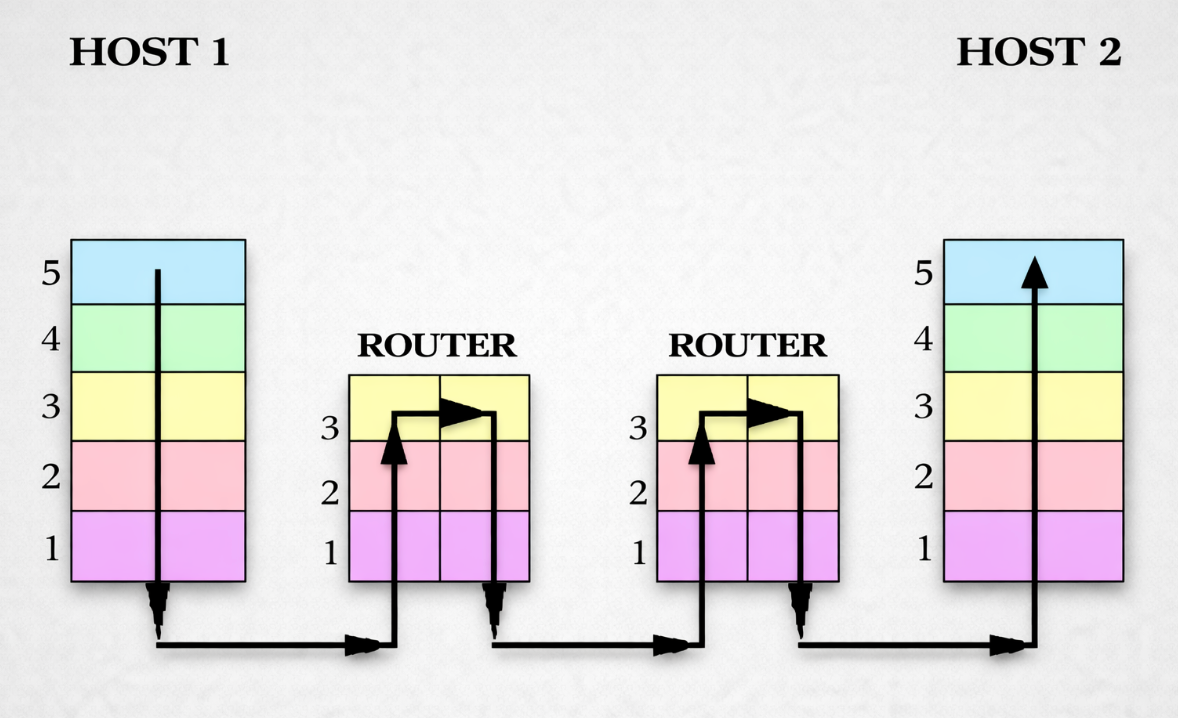
The Internet is fundamentally based on an unreliable, connectionless protocol: the Internet Protocol, abbreviated as IP (Postel, 1981).
It is a best-effort packet protocol. This means that the service provides no guarantees regarding delivery, the time taken between transmission and reception, or the quality and integrity of the service during transmission. As we have seen, these quality attributes are implemented at the transport layer.
The fact that IP is best effort does not mean that it is useless or poorly designed. It means that IP performs a specific task: attempting to deliver packets to their destination. When reliability, reordering, or retransmission is required, these functions are handled by other protocols, such as TCP, or directly by the application (Postel, 1981).
As stated above, the main task of IP is addressing and routing between heterogeneous subnetworks, which use their own local addressing system, typically based on MAC addresses (Postel, 1981).
Different networks require a common addressing system in order to communicate with one another. This system is provided by the IP protocol.
Every device connected to an IP network—a network that uses the IP protocol—must have an IP address, which is a logical identifier used to reach it over the network (Hinden & Deering, 2006; Postel, 1981).
An IP address identifies the sender and receiver of a packet, even when they are located on different networks.
An IP address therefore has a different role from a MAC address:
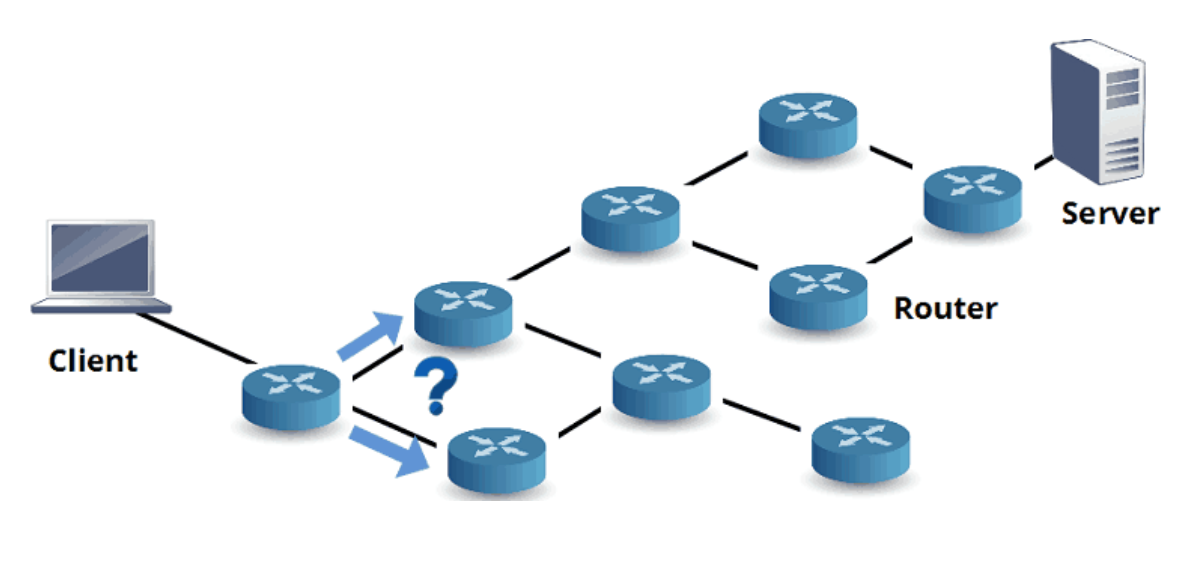
When a packet must reach a distant destination, it passes through several routers. Each router reads the destination IP address and decides which network or next router should receive the packet.
This procedure is called routing. Routing is the set of rules and mechanisms that allows packets to find a path across different networks to their destination (Baker, 1995).
The packet created by the IP protocol is called an IP packet.
Example
When a computer on a home network needs to reach a web server on the Internet, the IP packet contains the sender’s IP address and the destination IP address.
The home router forwards the packet to the operator’s network. From there, other routers read the destination IP address and decide, step by step, which path the packet should follow.
The Internet is also called a TCP/IP network because it is mainly based on two fundamental protocols, TCP and IP (Deering & Hinden, 2017; Postel, 1981):
The name TCP/IP therefore refers to the suite of protocols that allows computers to communicate over the Internet and many modern local networks.
IP address
An IP address, short for Internet Protocol address, is a unique number assigned to each device connected to the Internet (Hinden & Deering, 2006; Postel, 1981).
This address uniquely identifies a network interface on the Internet and enables data to be routed correctly to and from the device.
IP addresses have two main versions:
Historically, IPv4 has been the most widely used version and uses 32-bit addresses. As the Internet grew, the IPv4 address space was progressively exhausted (Internet Corporation for Assigned Names and Numbers [ICANN], 2011).
IPv6 was introduced for this reason. It uses 128-bit addresses and provides a vastly larger address space (Deering & Hinden, 2017).
It is important to note that an IP address refers not to the host itself but to one of its network interfaces. For example (Hinden & Deering, 2006):
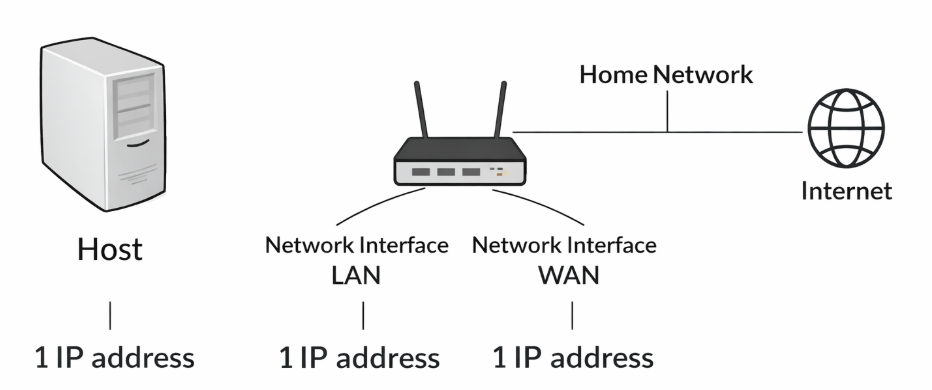
Why do IP addresses exist when MAC addresses already exist?
IP addresses are required for global routing, whereas MAC addresses are limited to the local network.
The main reasons are:
Public IP addresses are allocated in blocks by Regional Internet Registries (RIRs). ISPs obtain these blocks and distribute the addresses to customers such as businesses, organizations, and home users (Internet Assigned Numbers Authority [IANA], n.d.).
To optimize the use of available addresses, ISPs often assign dynamic IP addresses..
A domain name can be associated with one or more IP addresses, and similarly, an IP address can be associated with one or more domains.
When a domain is associated with multiple IP addresses, DNS does not directly route the traffic; instead, it returns one or more available addresses to the device.
The selection can be made in different ways: the DNS server can alternate the returned addresses, as in DNS round-robin, where the server changes the order of the returned IP addresses cyclically to distribute requests, or it can select them according to criteria such as the user’s geographic location, server load, or server availability. Once the DNS response has been received, the user’s device establishes a connection to one of the returned IP addresses.
IP addresses can be:
Static IP Address
A static IP address is permanently configured on a device or assigned on a fixed basis by a network administrator or an Internet Service Provider (Droms, 1997).
This type of address remains fixed, meaning that the device uses the same IP address whenever it connects to the network. Static IP addresses are often used for servers, critical network devices, and devices that must always be reachable through the same address.
Dynamic IP Address
A dynamic IP address is assigned temporarily to a device whenever it connects to the network.
Dynamic IP addresses are managed by a DHCP (Dynamic Host Configuration Protocol) server, which automatically assigns addresses to devices from a pool of available IP addresses (Droms, 1997).
These addresses may change whenever the device reconnects to the network or after a certain period of time.
Dynamic IP addresses are often used for home devices and ordinary users because they allow available addresses to be used more efficiently. When a device is not connected, its address can return to the pool and be assigned to another device.
IPV4
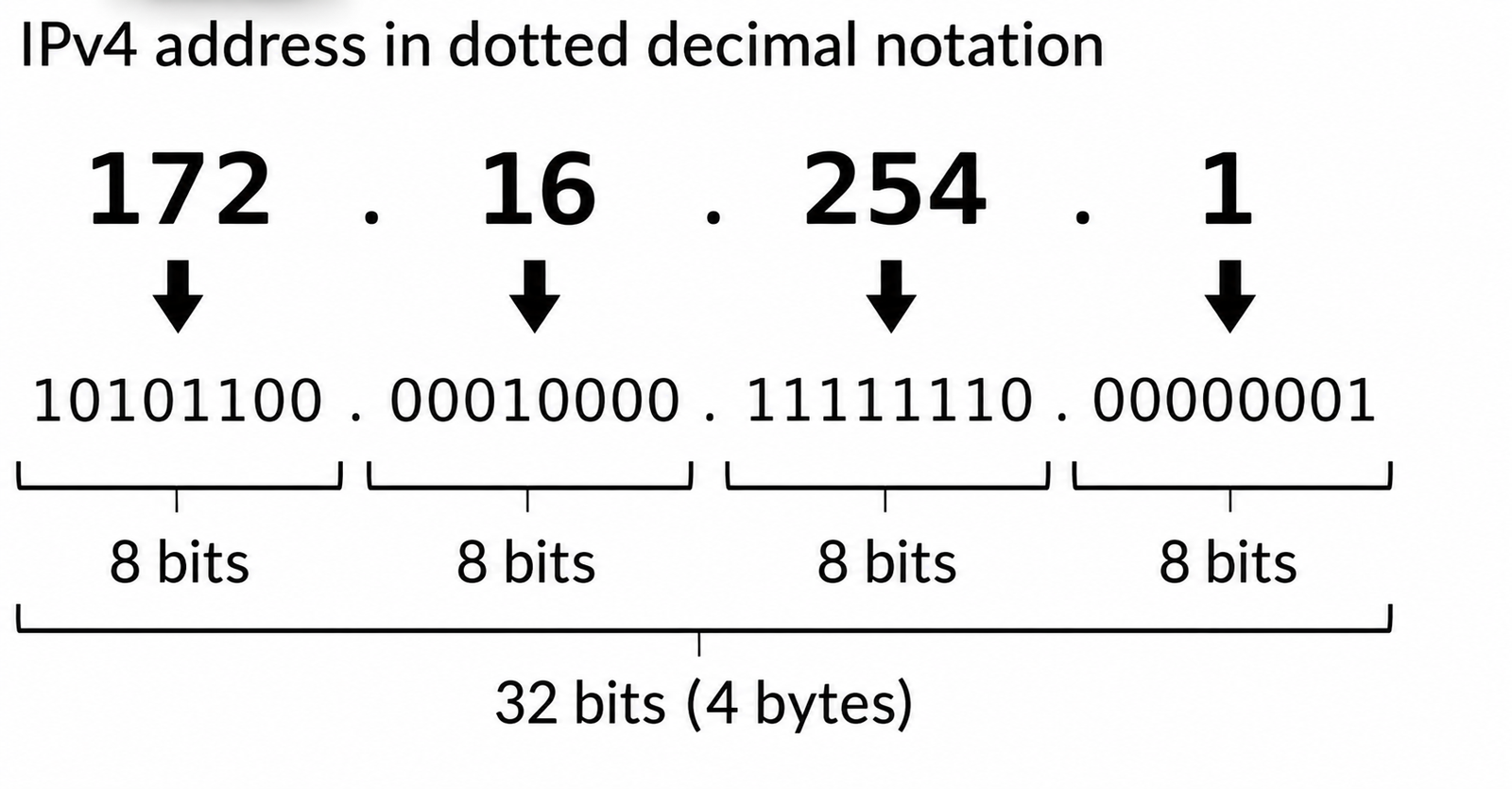
An IPv4 address consists of 32 bits, or four bytes, divided into four groups of 8 bits. Each group is separated by a dot, for example 11001001.00100100.10101111.00001111 (Postel, 1981).
Each of these four bytes can be converted into decimal form to make the address easier to read.
Each byte ranges from 0 to 255 because there are 28=256, which is the number of combinations available with 8 bits.
An IPv4 address is therefore written as four decimal numbers separated by dots, for example 192.168.1.10.
Because IPv4 addresses contain 32 bits, the number of possible combinations is 232, approximately 4 billion (Postel, 1981).
At first, this number seemed enormous, but as the Internet grew, the available public IPv4 addresses became insufficient.
Today, each person may use many connected devices, such as smartphones, computers, tablets, smart TVs, and IoT devices.
Solutions such as private addresses were introduced to reduce the consumption of public addresses, while IPv6 was developed to provide a much larger address space (Deering & Hinden, 2017; Rekhter et al., 1996).
In-depth
IP addresses are suitable for very large networks such as the Internet because they have a hierarchical structure, which makes it possible to organize devices into networks and subnets.
An IP address, in fact, does not simply identify a device, but also contains information about the network to which it belongs.
This allows routers to manage traffic without having to know every device connected to the Internet individually.
For example, imagine that an operator owns an entire network identified by the prefix 203.0.112.0/20.
Where:
Within this network, there may be thousands of devices, each with its own IP address.
An external router, however, does not need to store a separate route for each of them: it can simply know that all addresses belonging to that prefix must be sent toward that operator.
The process can therefore take place progressively:
Internet → ISP → subnet → device
As the packet gets closer to its destination, routers use increasingly specific information.
This principle is known as route aggregation and makes it possible to greatly reduce the amount of information that routers need to store.
MAC addresses work differently.
An address such as: 3C:52:82:A1:43:11
identifies a network interface, but does not indicate which network it is located on. Two devices with similar MAC addresses may be located in completely different parts of the world. A MAC address therefore does not have a structure that allows routers to easily group devices according to their location within the network.
If the Internet used MAC addresses directly for routing, routers would theoretically have to maintain much more detailed information about individual devices and their locations.
With IP addresses, by contrast, entire groups of devices can be represented using only a few network prefixes.
A useful analogy is the postal system. A postal address is organized hierarchically:
Italy → Lombardy → Milan → Via Roma → number 15
A national postal sorting center does not need to know the exact location of an individual house: initially, it only needs to know that a letter addressed to Milan must be sent toward Milan.
The subsequent sorting centers will then progressively identify the area, the street, and finally the street number.
A MAC address, by contrast, would be more similar to a personal identification code with no geographical information. Knowing the code would make it possible to identify the recipient, but not where the letter should be sent.
For this reason, the two types of addresses have different and complementary functions: an IP address makes it possible to locate a destination within a hierarchical network and route packets on a large scale, while a MAC address is mainly used to identify network interfaces and deliver packets within the local link
Private and public address
A private IP address is assigned to a device within a local network, such as a home or business network, and cannot be accessed or routed directly over the Internet (Rekhter et al., 1996).
A public IP address is routable over the Internet. It can identify a device or router on the global network and can be reached by other Internet hosts when firewall rules and configuration permit it.
Private IP addresses operate within local networks.
When a device needs to communicate over the Internet, the router translates its private IP address into a public IP address. This allows several devices on the same local network to share one public IP address instead of requiring a different public address for each device (Srisuresh & Egevang, 2001).
Private addresses therefore provide the following advantages:
Thanks to this technique, ISPs usually assign only one public IP address to each customer, even when dozens of devices connect to the Internet.
To summarize:
Example
Imagine a home network containing several devices, including computers, mobile phones, printers, and smart TVs. All these devices connect to a Wi-Fi router to access the Internet.
In this situation, the router assigns each device a private IP address from the private address range, for example 192.168.1.2, 192.168.1.3, and so on.
When one of these devices accesses the Internet, the router translates the device’s private IP address into the single public IP address assigned by the ISP.
This public IP address is what Internet servers see when the device sends requests.
Practical Example:
How exactly does the router translate a private IP address into a public one, and vice versa?
Network Address Translation (NAT) is a technique that allows several devices on a LAN to share one public IP address when connecting to the Internet (Srisuresh & Egevang, 2001; Srisuresh & Holdrege, 1999).
When a device on the LAN sends an Internet request using its private IP address, the router’s NAT operates as follows (Srisuresh & Egevang, 2001):
When the server replies, it sends the packet to the router’s public IP address and the port used by NAT.
At this point:
Note:
In everyday language, this mechanism is often simply called NAT. More precisely, however, the advanced form described here is called PAT or NAPT, and it is commonly used in home networks (Srisuresh & Holdrege, 1999).
Example
Imagine the following situation:
1. Sending the Request
Your PC sends a packet to 93.184.216.34 on port 80, but it cannot access the Internet using a private IP address. Therefore the router modifies the packet through NAT:
| Public Port | Internal IP Address | Internal Port |
|---|---|---|
| 60001 | 192.168.1.100 | 54321 |
2. Receiving the Response
IPV6
IPv6 is a more recent version of the IP protocol, introduced primarily to solve the shortage of IPv4 addresses (Deering & Hinden, 2017).
The most evident difference is the larger address space: IPv4 uses 32-bit addresses, whereas IPv6 uses 128-bit addresses.
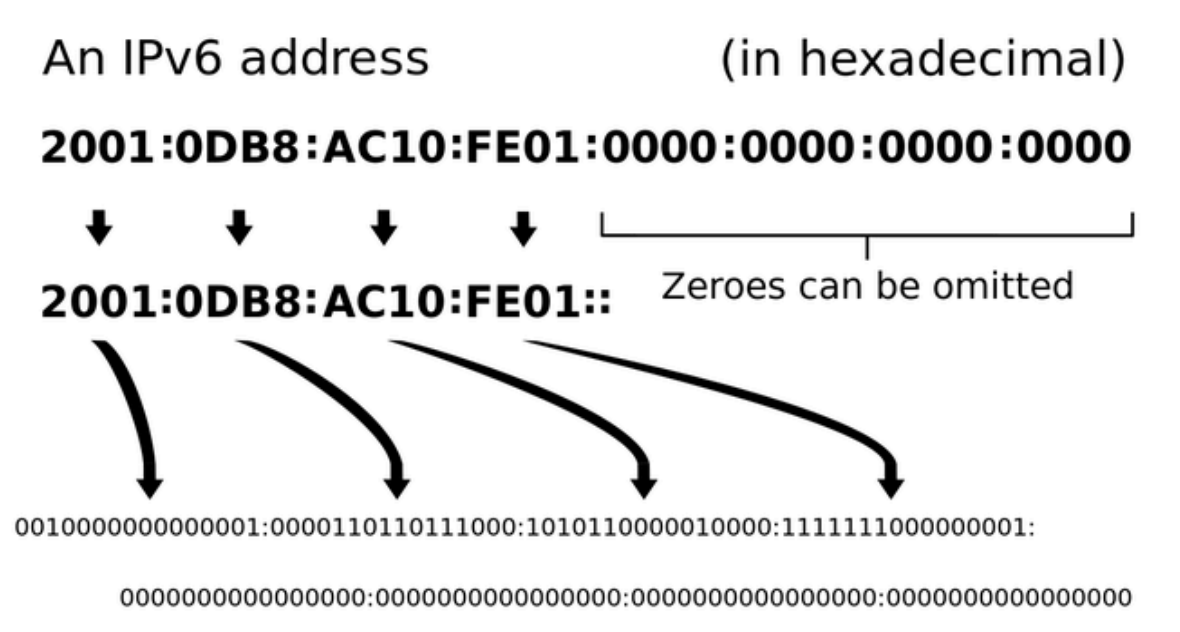
The difference is immediately visible in the address format:
With 128 bits, written in hexadecimal form for readability, IPv6 can generate far more unique IP addresses than a 32-bit system (Hinden & Deering, 2006).
The scale of this difference becomes clearer through comparison. IPv4’s address space of approximately 4.3 billion addresses is not enough to give every person on Earth a unique address, while a 128-bit system could theoretically assign an IP address to every grain of sand on the planet.
The 128 bits of an IPv6 address are divided into eight 16-bit blocks.
Using hexadecimal notation, each 16-bit block can be represented by four digits or letters, with colons used as separators.
Example
2001:0620:0000:0000:0211:24FF:FE80:C12C
A shorter notation is commonly used to make IPv6 addresses easier to write (Kawamura & Kawashima, 2010):
Example
2001:0620:0000:0000:0211:24FF:FE80:C12C
becomes
2001:620:0:0:211:24FF:FE80:C12C
IPv6 addresses can be compressed further by replacing one consecutive sequence of all-zero hexadecimal blocks with the symbol “::” (Kawamura & Kawashima, 2010).
The :: compression symbol can be used only once within an IPv6 address. If it appeared more than once, it would be impossible to determine how many zero blocks had been omitted at each position (Kawamura & Kawashima, 2010).
Example
2001:0620:0000:0000:0211:24FF:FE80:C12C
becomes
2001:620:0:0:211:24FF:FE80:C12C
becomes
2001:620::211:24FF:FE80:C12C
Because IPv6 provides an enormous number of available addresses, NAT becomes less necessary as a method for allowing many devices to share the same public address.
The goal of IPv6 is to allow many devices to have a unique global address.
IPv6 also provides addresses intended for internal use on local networks, called Unique Local Addresses (ULAs) (Hinden & Haberman, 2005).
These addresses are not intended to be routed over the global Internet.
ULAs provide stable IPv6 addresses that can be used only within an internal network without exposing the devices to the global Internet. For example, a printer needs to communicate with its local LAN, not with the entire Internet.
Although IPv6 solves many of IPv4’s limitations, IPv4 addresses are still widely used.
The main reason is that the Internet was created and developed for many years using IPv4, so a large number of networks, devices, servers, software systems, and configurations still support it.
A complete transition to IPv6 requires time, technical upgrades, and compatibility between different systems.
For this reason, IPv4 and IPv6 coexist today. Many networks still use IPv4, often with techniques such as NAT and private addresses, while IPv6 is being introduced gradually to support broader and more modern network growth (Deering & Hinden, 2017).
Routing
After examining IP addresses, we can ask how a packet manages to reach a distant network.
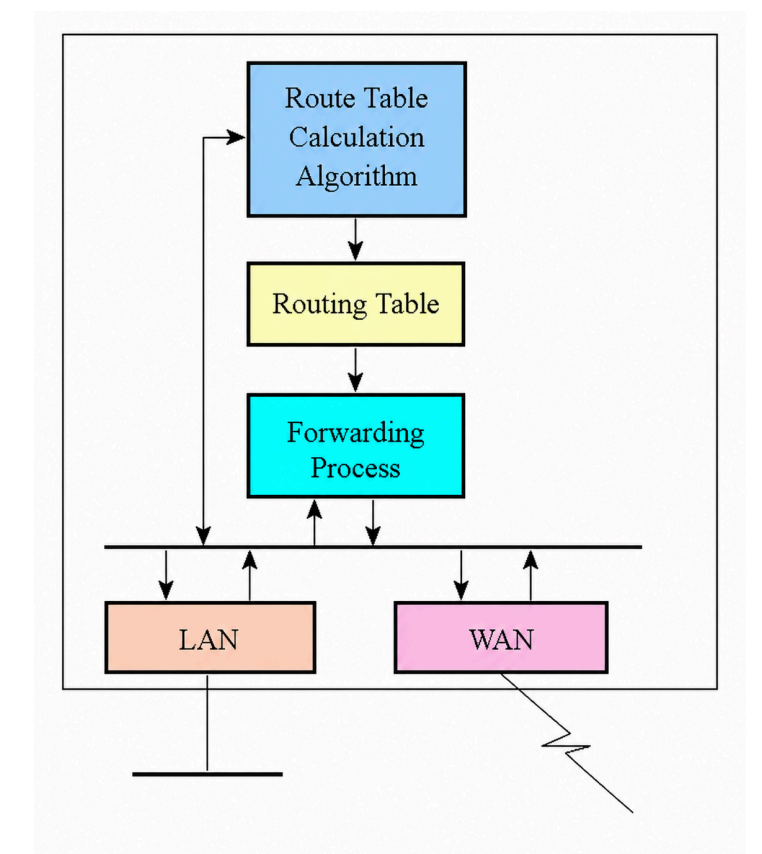
Routing is the process of determining the optimal path—the most suitable path according to the available information and configured rules—through which data is directed from a source to a destination within one network or across different networks (Baker, 1995).
Routers maintain routing tables containing information about reachable networks and the next step required to reach them. This step may be another router, called the next hop, or a network directly connected to the router (Baker, 1995).
Routers can learn and update routes dynamically in response to changes in network topology or network conditions.
This allows routing tables to adapt to changes in the network.
After routing has determined the optimal route, forwarding is the actual operation in which the router takes an individual packet, reads its destination IP address, consults the routing table, and sends it through the correct outgoing interface. This process enables the packet to reach its final destination through the network using the best available path (Baker, 1995).
The forwarding process in a router works as follows:
Routing tables can be configured manually by a network administrator or updated automatically through routing protocols. These protocols allow routers to exchange information about reachable networks and adapt to network changes (Baker, 1995).
Key points
What does the router have to do?
A computer on a home network needs to send a packet to a web server on the Internet.
The packet passes through the home router and then through several routers in the ISP’s network.
Answer the following questions:
IP or MAC?
A school has two different LANs connected through a router.
Computer A is located in LAN 1 and needs to communicate with computer B, which is located in LAN 2.
Both computers have a MAC address and an IP address.
Analyze the communication.
Assigning addresses on a network
A company has:
The administrator must decide which devices should use static IP addresses and which should use dynamic IP addresses.
Answer the following questions:
A home with only one public IP address
A family has the following devices:
The computer opens a connection to a web server using source port 52341. The router temporarily translates the communication using public port 60001.
Analyze what happens.
IPv4 and IPv6
Consider the following two addresses:
Answer the following questions:
Routing or forwarding?
A router receives a packet addressed to a remote network.
Its routing table contains the following information:
For all other destinations, a default route is configured through Router 4.
Answer the following questions:
To create these materials, I used generative artificial intelligence tools to support the writing process, particularly to improve the wording and style of the text, reorganize content, refine phrasing, and speed up certain editorial tasks.
Since I work independently on the production of these materials, I try to automate all activities that can reasonably be automated, so that I can devote more time to research, design, and content development.
However, artificial intelligence does not determine the content of the work: the selection of topics, structure, ideas, interpretations, examples, and teaching approach are developed by me. AI is therefore used primarily as a tool to support production and formal revision, while authorship and responsibility for the design and development of the content remain mine.
Unless otherwise stated, this material is licensed under the Creative Commons Attribution–NonCommercial–ShareAlike 4.0 International License (CC BY-NC-SA 4.0).
You are therefore free to share, redistribute, adapt, and create derivative works based on this material, provided that proper attribution is given, the material is not used for commercial purposes, and any modified or derivative versions are distributed under the same license.

Vuoi aiutarmi a scrivere articoli come questo?


No responses yet