
Databases and network packets

This lesson introduces some fundamental concepts of computer networks: databases and packets in networks.
After defining what a computer network, the Internet, and a host are, the text explains the role of databases in online services: storing, organizing, and retrieving information such as profiles, messages, products, or school data.
The lesson then introduces the DBMS, relational databases, tables, fields, records, and queries, showing how data can be linked through common IDs.
In the final section, the concept of a packet is introduced: the unit of data transmitted over a network, consisting of a header and a payload.

Network Fundamentals

A computer network—also called a data network or simply a network—is a group of autonomous devices connected to one another and capable of exchanging data through shared technologies (Kurose & Ross, 2026; Tanenbaum et al., 2022).

Two computers are considered connected when they are able to exchange information. 
The Internet is the best-known example of a computer network: it is a large global network connecting billions of hosts around the world (Kurose & Ross, 2026).

A host is any device connected to a network (Kurose & Ross, 2026).
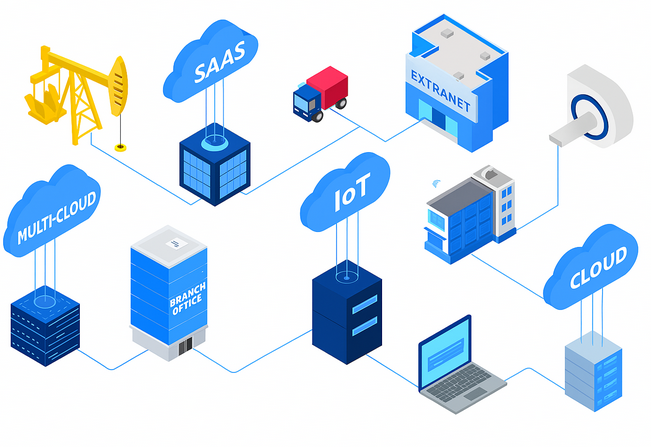
dispositivi connessi a Internet

Database

A network allows multiple devices to communicate and exchange information. However, many network services do more than simply transmit data from one device to another: they must also store, organise, and retrieve it when needed.
For example, a social network must store profiles, posts, and messages; an e-commerce website must manage products, users, orders, and payments; and a school platform must store information about students, teachers, grades, absences, and communications.

Databases are used to perform these functions.

A database is a collection of information, or data, organised in a structured way and generally stored electronically within a computer system (Hoffer et al., 2026).

Databases are essential to the Internet because they make it possible to store, organise, and quickly retrieve enormous amounts of data reliably, such as user profiles, posts, products, payments, messages, bookings, logs, and permissions.
A database is managed by software called a DBMS, an acronym for Database Management System. A DBMS makes it possible to insert, modify, delete, search, and organise data (Hoffer et al., 2026).
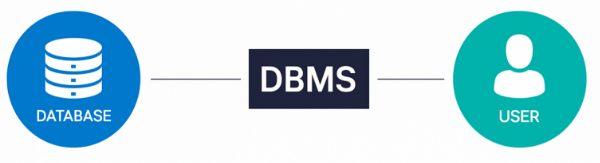
Il DBMS collega l'utente al database

Most databases are relational databases (Hoffer et al., 2026).
Data in relational databases is generally organised into rows and columns contained in a series of tables (Hoffer et al., 2026).
A table consists of:

  • Fields, which are the columns.
  • Records, which are the rows.

A record is a row in a table and represents a single stored item, such as a student.
A field is a column in a table and represents one of the characteristics of that item, such as first name, last name, or class.
When a new item is added to the table, a new record is inserted.
For example, adding a new student means creating a new row in the “Students” table.

Example
Below is a table containing student records, where:

  • Each field is an attribute of the record.
  • Each record represents one student.
STUDENT TABLE
First name Last name Class
Mario Rossi 3
Giuseppe Bianchi 3
Luca Verdi 2

A query is a request sent to a database. It can be used to search for data, insert new data, modify existing data, or delete data.

Example
For example, a query could ask the database to display all the students in class 3A.

The main characteristic of relational databases is that tables can be connected to one another through common fields, such as an identification code or ID (Hoffer et al., 2026).
For example, a “Students” table can be connected to a “Classes” table through the class ID. This makes it possible to organise large amounts of data, avoid unnecessary duplication, and easily retrieve information through queries.
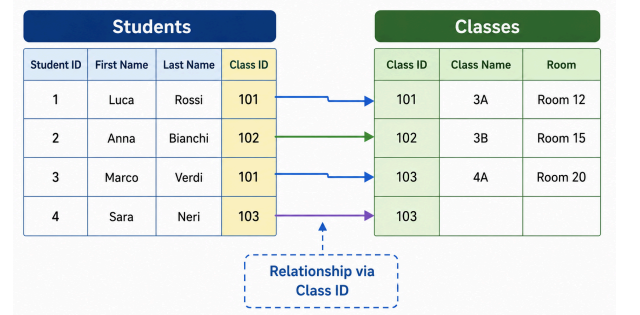
La tabella "Studenti" è collegata alla tabella "Classi" tramite ID

Many relational databases use SQL, which stands for Structured Query Language, a language used to create, modify, and query tables (Hoffer et al., 2026).

Example
Imagine an application used to manage a library, in which you need to keep track of books, authors, and customers. In this case, a database could be used to organise and store all the relevant information.

Database structure

  • “Books” table
    Fields: ID, Title, Author ID, Publication Year, Genre, ISBN, Available Quantity.
  • “Authors” table
    Fields: ID, First Name, Last Name, Date of Birth, Nationality.
  • “Customers” table
    Fields: ID, First Name, Last Name, Email, Telephone Number, Registration Date.
  • “Loans” table
    Fields: ID, Book ID, Customer ID, Loan Date, Expected Return Date.

Example of use
Suppose that a new customer named Marco registers with the library and wants to borrow The Lord of the Rings by J.R.R. Tolkien. The application would use the database in the following way:

  • The application checks whether The Lord of the Rings is available by examining the available quantity in the “Books” table.
  • After confirming that the book is available, the application creates a new record in the “Loans” table containing information about Marco, the book, and the loan date.
  • The available quantity of the book is reduced by one because one copy has been borrowed.
  • If Marco returns the book by the expected return date, the application updates the record in the “Loans” table with the actual return date.
  • If the application receives new books to catalogue, they are added to the “Books” table, while the corresponding authors are added to the “Authors” table.
  • If a customer forgets to return a book by the expected date, the application can send a notification reminding the customer to return it.
  • The application can generate reports using the information stored in the database. For example, it can display the books that are currently on loan, identify the most popular books based on the number of loans, or produce a list of the authors represented in the library.

In this example, the database plays a fundamental role in organising and managing information about the library’s books, authors, and customers. It simplifies the borrowing and returning process and provides tools for analysing data about the library’s activities

Network packet

Many network services use databases to store and retrieve information.
However, when this data needs to travel from one device to another—for example, from a server to our computer—it is not sent as a single block. Instead, it is divided into smaller units called packets (Kurose & Ross, 2026).
A packet is a small unit of data transmitted through a network. Each packet contains both technical information, which is necessary to deliver it to the correct destination, and the actual data being transmitted (Deering & Hinden, 2017; Kurose & Ross, 2026).

A packet is generally divided into two main sections:
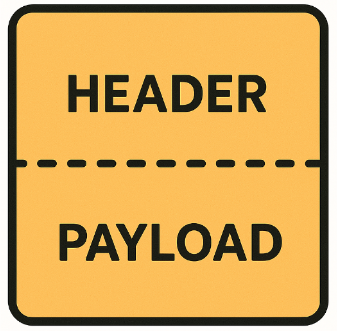
  • Header: contains information required for transmission, such as the sender’s and recipient’s addresses, and allows network devices to route the packet.
  • Payload: contains the actual data being transmitted, such as part of the text of a message, a web page, an image, or a video (Deering & Hinden, 2017).
Il pacchetto è diviso in header e payload

Key points

  • The Internet is a global network made up of billions of connected devices, called hosts.
  • A database stores and organizes data in electronic form.
  • A DBMS is the software used to manage a database.
  • In relational databases, data is organized into tables, made up of records (rows) and fields (columns).
  • Tables can be linked through identification codes called IDs.
  • A query is a request to search, insert, modify, or delete data; many databases use the SQL language.
  • Data travels across a network in the form of packets, which consist of a header and a payload

Download the lesson PDF

  • Deering, S., & Hinden, R. (2017). Internet Protocol, Version 6 (IPv6) specification (RFC 8200). RFC Editor. https://doi.org/10.17487/RFC8200
  • Hoffer, J. A., Topi, H., Venkataraman, R., & Bala, H. (2026). Modern database management (14th ed.). Pearson.
  • Kurose, J. F., & Ross, K. W. (2026). Computer networking: A top-down approach (9th ed.). Pearson.
  • Tanenbaum, A. S., Feamster, N., & Wetherall, D. J. (2022). Computer networks (6th ed.). Pearson.
  • James F. Kurose and Keith W. Ross, Computer Networking: A Top-Down Approach, 9th ed., Pearson, 2026 — Provides an accessible introduction to computer networks and the Internet, explaining hosts, network architecture, packet switching, protocols, and the mechanisms through which data travels across interconnected networks.
  • Andrew S. Tanenbaum, Nick Feamster, and David J. Wetherall, Computer Networks, 6th ed., Pearson, 2022 — Offers a broad and systematic introduction to computer networks, covering network architectures, protocols, packet transmission, network devices, and the technologies that enable communication between computers.
  • Jeffrey A. Hoffer, Heikki Topi, Ramesh Venkataraman, and Hillol Bala, Modern Database Management, 14th ed., Pearson, 2026 — Provides a comprehensive introduction to database management, relational databases, data modelling, tables, relationships, database design, and SQL.
  • Ramez Elmasri and Shamkant B. Navathe, Fundamentals of Database Systems, 7th ed., Pearson, 2022 — Explores the fundamental principles of database systems, including DBMS architecture, the relational model, tables, constraints, relationships, SQL, database design, and normalization.
  • Abraham Silberschatz, Henry F. Korth, and S. Sudarshan, Database System Concepts, 7th ed., McGraw Hill, 2020 — Introduces database systems through an intuitive approach, with detailed coverage of the relational model, SQL, database design, queries, data storage, and the internal mechanisms used by database management systems.

The School Network

A school has 25 computers in its computer lab, 4 network printers, a server that stores educational materials, and several tablets used by teachers. All these devices can communicate with one another through the school network.

Answer the following questions:

  • Identify which devices can be considered hosts and explain why.
  • Can a computer that is turned on but not connected to the network be considered a host on the school network? Explain your answer.
  • A student opens a document stored on the server from their computer. Describe, in general terms, what must happen between the two devices for the student to receive the document.
  • Explain why the simple fact that there are many computers in the school does not necessarily mean that a computer network exists.

Designing a Gym Database

A gym wants to create a system to manage its members. For each customer, it wants to store their first name, last name, email address, registration date, and membership type. It must also record the available classes and keep track of which classes each customer attends.

Design a possible database structure.

  • Identify at least three necessary tables.
  • For each table, indicate the main fields.
  • Write an example record for one of the tables.
  • Identify at least one field that could be used as an ID.
  • Explain how you would connect the tables in order to determine, for example, which classes a specific customer is enrolled in.
  • Explain what role the DBMS would play within this system.

Querying the School Database

A school uses a table called Students, consisting of the following fields:
ID | First Name | Last Name | Class | Email

The database contains 800 students.
The school administration needs to perform the following operations:

  • Retrieve a list of all students in class 3A.
  • Find the student with ID 427.
  • Add a newly enrolled student.
  • Update a student’s email address.
  • Delete a record that was entered by mistake.

For each operation:

  • Explain what type of request should be sent to the database.
  • Indicate which fields would be needed to identify the relevant records.
  • Explain why using an ID can be more reliable than searching for a student only by first name and last name.
  • Indicate which operations modify the data stored in the database and which only retrieve it.

You do not need to write SQL code: you only need to correctly describe what the query should do.

The Database of a Streaming Platform

A platform wants to store information about its users and the available movies.
Initially, the following single table is proposed:
Username | Email | Movie Title | Director | Year | Viewing Date

A user who watches one hundred movies therefore appears one hundred times in the table, and the information about the same movie is repeated for every user who has watched it.

Analyze the problem and propose a better solution.

  • Explain what problems this data organization may cause.
  • Divide the information into multiple relational tables.
  • Indicate the main fields of each table.
  • Introduce the IDs needed to connect the tables.
  • Explain how a query could reconstruct the list of all movies watched by a specific user.
  • Explain why the proposed solution reduces unnecessary repetition compared with the original table.

From the Server to Your Computer

Open an online platform and request an image stored on its server. The image must then travel across the network to your computer.

Using the concepts from the course material, describe what happens to the data during transmission.

  • Explain why the image is not necessarily transmitted as a single large block of data.
  • Explain what packets are.
  • For a hypothetical packet carrying part of the image, indicate which information belongs to the header and which belongs to the payload.
  • Explain why the destination address should not be stored only in the payload.
  • Imagine that a packet correctly contains part of the image but lacks the information needed to reach its destination: explain which part of the packet contains the problem and why communication might fail.
  • Finally, reconstruct the complete conceptual path: stored data → retrieval from the system → division for transmission → packets → reception on the device.

To create these materials, I used generative artificial intelligence tools to support the writing process, particularly to improve the wording and style of the text, reorganize content, refine phrasing, and speed up certain editorial tasks.
Since I work independently on the production of these materials, I try to automate all activities that can reasonably be automated, so that I can devote more time to research, design, and content development.

However, artificial intelligence does not determine the content of the work: the selection of topics, structure, ideas, interpretations, examples, and teaching approach are developed by me. AI is therefore used primarily as a tool to support production and formal revision, while authorship and responsibility for the design and development of the content remain mine.

Unless otherwise stated, this material is licensed under the Creative Commons Attribution–NonCommercial–ShareAlike 4.0 International License (CC BY-NC-SA 4.0).

You are therefore free to share, redistribute, adapt, and create derivative works based on this material, provided that proper attribution is given, the material is not used for commercial purposes, and any modified or derivative versions are distributed under the same license.

Do you want to help me write articles like this one?


Leave a Reply

Your email address will not be published. Required fields are marked *

No responses yet

Sostieni il progetto

Tutti i materiali che condivido nascono da una convinzione molto semplice: una buona formazione non dovrebbe limitarsi a insegnare quali pulsanti premere, ma aiutare a comprendere le idee, i principi e i processi che stanno dietro agli strumenti.

Per questo dedico una parte significativa del mio tempo a studiare, organizzare e produrre contenuti gratuiti dedicati al multimedia, al design e alla comunicazione visiva. Articoli, lezioni, approfondimenti e risorse che hanno l’obiettivo di rendere accessibili argomenti spesso affrontati in modo frammentario o superficiale.

Questo lavoro richiede però tempo, ricerca e cura. Ogni guida, ogni video, ogni materiale pubblicato gratuitamente è il risultato di molte ore di studio, scrittura e revisione.
Sostenere il progetto attraverso Patreon significa permettermi di continuare a produrre contenuti educativi di qualità, mantenerli accessibili al maggior numero possibile di persone e dedicare più energie alla costruzione di una risorsa che possa essere utile a studenti, professionisti e appassionati.

Se credi che una conoscenza più profonda, rigorosa e consapevole del multimedia abbia valore, il tuo contributo non sostiene soltanto il mio lavoro: aiuta a rendere queste risorse disponibili per tutta la comunità.
Grazie per il supporto e per la fiducia.

Patreon è troppo impegnativo?

Puoi sostenermi anche con una donazione libera, senza abbonamento e senza impegno.
Anche un piccolo contributo mi aiuta a continuare a creare giochi, contenuti didattici e materiali gratuiti con più libertà.

Support the project

All the materials I share stem from a very simple conviction: good training should not be limited to teaching which buttons to press, but should help people understand the ideas, principles, and processes behind the tools.

That is why I dedicate a significant portion of my time to researching, organizing, and producing free content focused on multimedia, design, and visual communication—articles, lessons, in-depth analyses, and resources aimed at making accessible topics that are often addressed in a fragmented or superficial way.

However, this work requires time, research, and care. Every guide, video, and piece of material published for free is the result of many hours of study, writing, and revision.
Supporting the project via Patreon enables me to continue producing high-quality educational content, keep it accessible to as many people as possible, and devote more energy to building a resource that benefits students, professionals, and enthusiasts alike.

If you believe that a deeper, more rigorous, and informed understanding of multimedia is valuable, your contribution does more than just support my work: it helps make these resources available to the entire community.
Thank you for your support and trust.

Is Patreon too demanding?

You can also support me with a voluntary donation—no subscription or commitment required.

Even a small contribution helps me continue creating games, educational content, and free materials with greater freedom.