
Link layer, Ethernet frames, and MAC addresses

The link layer, Ethernet frames, and MAC addresses are the core concepts of this lesson, which focuses on local communication between devices connected to the same network segment.

The text introduces the link layer—or data link layer—explaining that its function is to receive packets from the network layer and encapsulate them into frames, which are units suitable for transmission over the physical layer. The lesson then describes the roles of MAC addresses, the Ethernet protocol, and the frame structure, which consists of a header, payload, and trailer. It also examines error control mechanisms using FCS and CRC, which make it possible to verify whether a frame has arrived intact.

Finally, the lesson analyzes the journey of a web request across the network, demonstrating how the IP packet retains the sender’s and final recipient’s IP addresses, whereas the link-layer frame changes at each stage of the path between hosts, gateways, and routers.

Link level

The data link layer (or link layer) is located below the network layer and above the physical layer.
This layer receives packets from the network layer and encapsulates them into units that are then transmitted through the physical layer.
Its role is to manage communication over a single local link, using rules suited to the technology in use, for example Ethernet or Wi-Fi (Braden, 1989; Institute of Electrical and Electronics Engineers [IEEE], 2022).
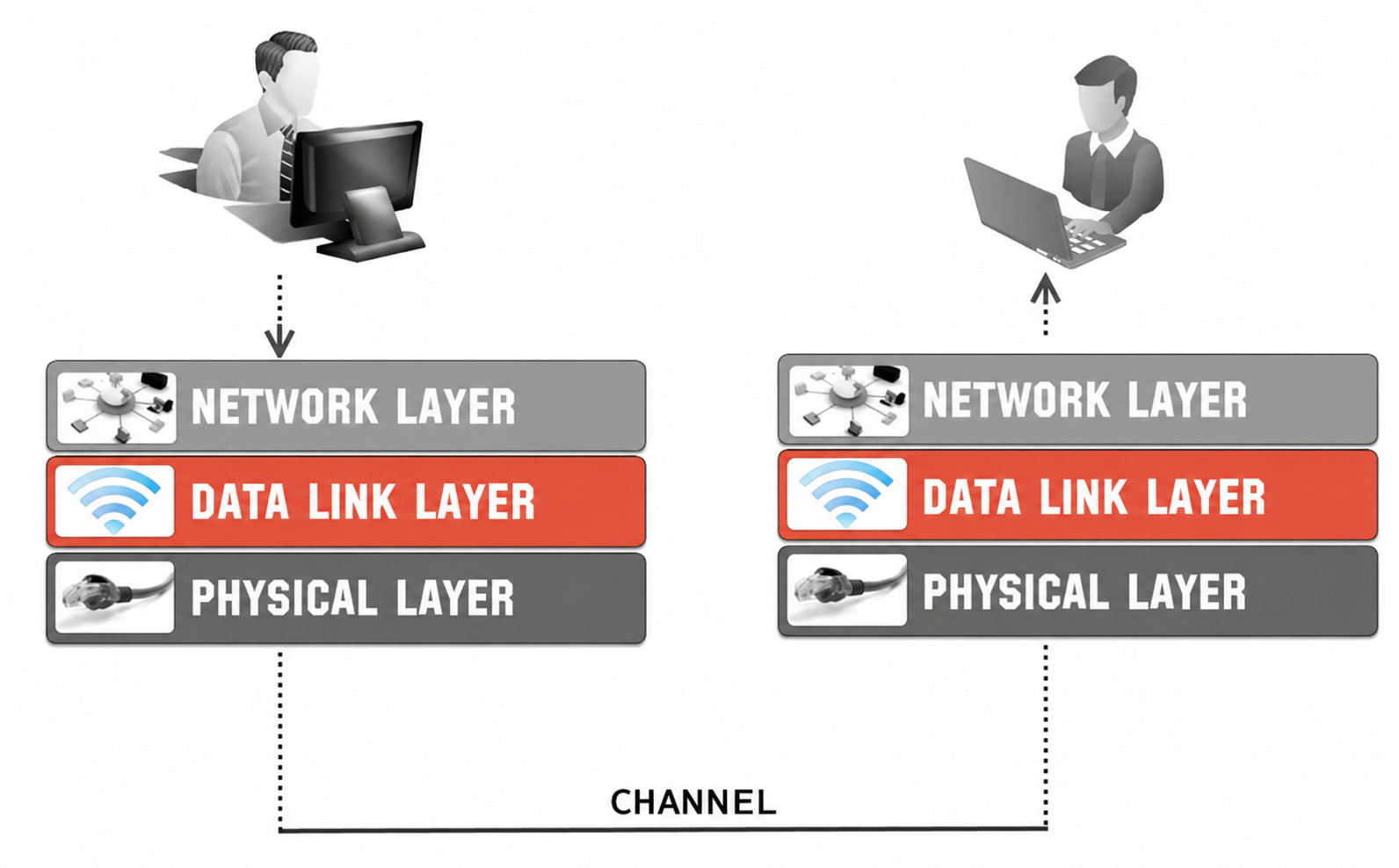
The data link layer is responsible for:

  • Organizing the raw bits transmitted by the physical layer into readable and manageable units.
  • Addressing devices on the local network using MAC addresses (IEEE, 2022).
  • Checking for errors in local transmission:
  • Checking whether the data arrived intact, using error-detection codes (a strategy used by Ethernet).
  • Requesting retransmission when an error occurs (a strategy not used by Ethernet, but used by other technologies).
  • Avoiding conflicts and collisions, especially on shared networks.

One of the most widely used protocols at this layer is Ethernet; the data unit handled is called a frame (IEEE, 2022).

An Ethernet frame is divided into the following parts:
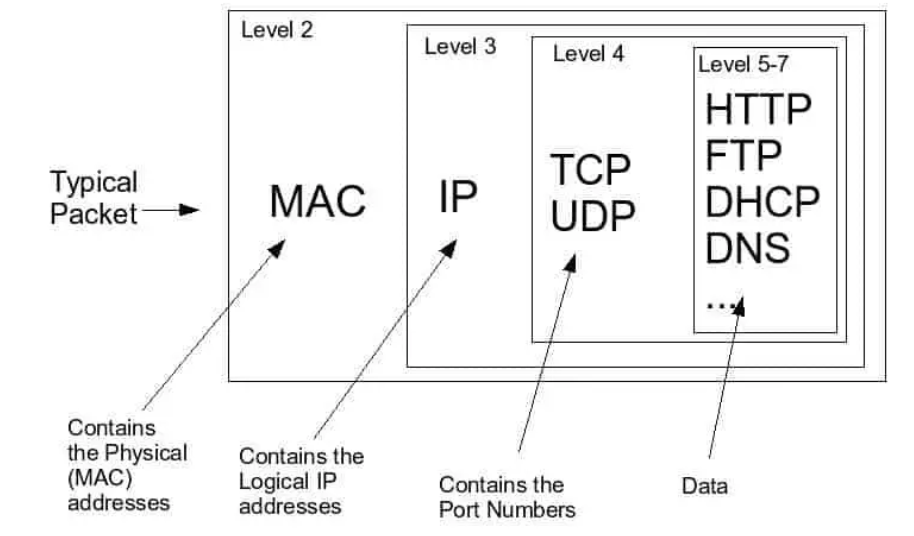
  • Header: contains information such as the sender and receiver MAC addresses.
  • Payload: the actual data (for example, an IP packet).
  • Trailer: contains a check code used to detect possible errors (IEEE, 2022

Error checking

The check code used by Ethernet is called FCS, Frame Check Sequence (IEEE, 2022).
The FCS is a 32-bit value calculated from the contents of the frame using an algorithm called CRC, Cyclic Redundancy Check (IEEE, 2022).

  • If the value calculated by the receiver matches the value in the FCS field, the frame is considered correct.
  • If the values do not match, the frame has probably been altered during transmission and is discarded (IEEE, 2022).

CRC offers the following advantages:

  • It detects all single-bit errors (one incorrect bit among otherwise correct bits).
  • It detects many double or multiple errors (several consecutive incorrect bits among otherwise correct bits).
  • It detects error bursts (that is, errors concentrated in a portion of the frame).
  • It is very efficient to calculate, even in hardware (IEEE, 2022).

The steps below show how CRC works on the sender and receiver sides.

The sender

  • Takes the entire contents of the frame, excluding the FCS field (which will be added later).
  • Calculates the CRC on the contents of the frame.
  • Obtains a 32-bit value.
  • Inserts this value into the FCS field at the end of the frame (IEEE, 2022).

The receiver

  • Receives the entire frame, including the FCS field.
  • Performs the CRC check on the received frame.
  • Compares the result with the value in the FCS field:
  • If the two values match, the frame is assumed to be correct.
  • If the two values do not match, the frame is discarded (Ethernet does not provide automatic retransmission). If retransmission is required, it is handled by the upper layers (e.g. TCP at the transport layer) (Braden, 1989; Eddy, 2022).

Journey of a web request through the network

How does packet forwarding work from a source host to a destination host?
Below, we examine the different steps in a message flow that uses HTTP at the application layer, the protocol used to request and transfer web pages (Fielding et al., 2022).
In particular, we look at an HTTP request (the client asks the server for the web page):

  • Packet creation: the browser generates an HTTP request. The transport layer, using TCP, encapsulates the HTTP data in a TCP segment (Eddy, 2022; Fielding et al., 2022).
  • Network layer: the TCP segment passes to the network layer, which encapsulates the segment in an IP packet. This packet contains the destination IP address (obtained through DNS from the domain name) and the message payload (Eddy, 2022; Postel, 1981).
  • Link layer: this packet is then encapsulated inside an Ethernet frame. The frame uses the gateway’s MAC address as its destination because the final destination is outside the LAN. The host obtains the gateway’s MAC address through ARP (Address Resolution Protocol) in IPv4, or through Neighbor Discovery in IPv6. The corresponding tables are used to associate an IP address with a MAC address only on directly connected networks (Narten et al., 2007; Plummer, 1982).
  • Forwarding to the gateway: the Ethernet frame containing the packet is sent over the local network and reaches the gateway, which acts as the access point between the local network and the external network, in this case the Internet (Braden, 1989).
  • Routing and forwarding: the gateway extracts the IP packet from the frame, examines its destination IP address, and uses its routing tables to determine the next destination (usually another router) to which the packet should be forwarded toward the external network (Postel, 1981).
  • MAC lookup: once the next hop has been identified, the router obtains the associated MAC address through its ARP table (for IPv4) or Neighbor Discovery table (for IPv6).
  • MAC replacement: the router keeps the same IP packet, apart from some technical modifications, but encapsulates it in a new link-layer frame suited to the next link. In this new frame, the destination MAC address is that of the next router, or of the final host if it is on a directly connected network (Postel & Reynolds, 1988).
  • Forwarding to the next router: the IP packet is placed in an Ethernet frame and sent to the next router, which continues, at the network layer, to examine the destination IP address and forward the packet toward the following router using the identified router’s MAC address (Braden, 1989).
  • Repeating the forwarding process: this forwarding process is repeated along the chain of routers until the packet reaches the final recipient’s gateway.
  • Delivery to the destination host: the final gateway receives the frame, extracts the IP packet, and encapsulates it in a new Ethernet frame whose destination MAC address is that of the final host (obtained, if necessary, through ARP or Neighbor Discovery). With this new frame, the gateway delivers the packet to the destination host on the local network (Narten et al., 2007; Plummer, 1982).
  • Delivery to the application: the recipient’s transport layer reads the destination port of the TCP segment and delivers the data to the correct socket or application, in this case the HTTP software (the program that implements HTTP) (Eddy, 2022).

Note: it is important to emphasize that, along the path, the IP packet keeps the IP addresses of the sender and the final destination, while the link-layer frame changes at each hop of the network. Each router extracts the IP packet from the received frame and places it in a new frame suited to the next link (Braden, 1989; Postel & Reynolds, 1988).

Key points

  • The link layer manages communication between devices connected to the same local network.
  • The link layer receives IP packets and encapsulates them in units called frames.
  • The link layer uses MAC addresses to identify the sender and receiver on the local network.
  • The main link-layer technologies are Ethernet and Wi-Fi.
  • An Ethernet frame contains a header, payload, and trailer.
  • The payload normally contains the IP packet; the trailer contains the FCS check code.
  • CRC makes it possible to check whether the frame was altered during transmission.
  • If Ethernet detects an error, it discards the frame without directly requesting retransmission.
  • To reach an external network, the host sends the frame to the gateway’s MAC address.
  • ARP in IPv4 and Neighbor Discovery in IPv6 associate IP addresses with local MAC addresses.
  • Each router extracts the IP packet and places it in a new frame intended for the next link.
  • The IP addresses of the sender and final destination generally remain unchanged, while the MAC addresses change at each link.

Download the lesson PDF

  • Braden, R. (1989). Requirements for Internet hosts – Communication layers (RFC 1122). RFC Editor. https://doi.org/10.17487/RFC1122
  • Deering, S., & Hinden, R. (2017). Internet protocol, version 6 (IPv6) specification (RFC 8200). RFC Editor. https://doi.org/10.17487/RFC8200
  • Eddy, W. (Ed.). (2022). Transmission Control Protocol (TCP) (RFC 9293). RFC Editor. https://doi.org/10.17487/RFC9293
  • Fielding, R., Nottingham, M., & Reschke, J. (Eds.). (2022). HTTP semantics (RFC 9110). RFC Editor. https://doi.org/10.17487/RFC9110
  • Institute of Electrical and Electronics Engineers. (2022). IEEE standard for Ethernet (IEEE Std 802.3-2022). https://doi.org/10.1109/IEEESTD.2022.9844436
  • Narten, T., Nordmark, E., Simpson, W., & Soliman, H. (2007). Neighbor discovery for IP version 6 (IPv6) (RFC 4861). RFC Editor. https://doi.org/10.17487/RFC4861
  • Plummer, D. C. (1982). An Ethernet address resolution protocol (RFC 826). RFC Editor. https://doi.org/10.17487/RFC0826
  • Postel, J. (1981). Internet protocol (RFC 791). RFC Editor. https://doi.org/10.17487/RFC0791
  • Postel, J., & Reynolds, J. K. (1988). Standard for the transmission of IP datagrams over IEEE 802 networks (RFC 1042). RFC Editor. https://doi.org/10.17487/RFC1042
  • James F. Kurose and Keith W. Ross, Computer Networking: A Top-Down Approach, 9th ed., Pearson, 2026 — Provides a clear treatment of the link layer, including framing, error detection, multiple-access protocols, MAC addressing, ARP, Ethernet, switches, and the way link-layer communication interacts with IP forwarding across different networks.
  • Andrew S. Tanenbaum, Nick Feamster, and David J. Wetherall, Computer Networks, 6th ed., Pearson — Offers a systematic explanation of the data link layer and the MAC sublayer, covering framing, error detection and correction, Ethernet, shared-medium access, switching, wireless LANs, and communication between adjacent nodes.
  • Behrouz A. Forouzan, Data Communications and Networking with TCP/IP Protocol Suite, 6th ed., McGraw Hill, 2022 — Dedicates separate chapters to the data-link layer and LANs, making it particularly useful for studying frames, addressing, error detection, CRC, Ethernet, connecting devices, and the relationship between local delivery and the upper layers of the TCP/IP architecture.
  • Charles E. Spurgeon and Joann Zimmerman, Ethernet: The Definitive Guide, 2nd ed., O’Reilly Media, 2014 — Provides a specialized and detailed treatment of Ethernet, including Ethernet frames, MAC operation, media-access mechanisms, switching, physical Ethernet technologies, network design, and troubleshooting. It is particularly useful for going beyond the introductory Ethernet coverage of the handout.
  • Douglas E. Comer, Internetworking with TCP/IP, Volume One, 6th ed., Pearson, 2014 — Connects local-network technologies with the broader TCP/IP architecture and covers hardware addressing, Ethernet, Wi-Fi, bridging, protocol layering, address resolution, and the mechanisms that allow IP datagrams to be carried across different underlying networks.

Building and checking an Ethernet frame

A computer must send an IP packet to another device on the same LAN. To transmit it over Ethernet, the link layer places it inside a frame.

  • Explain the function of the link layer between the network layer and the physical layer.
  • Indicate what information must be placed in the Ethernet frame header.
  • Explain what makes up the frame payload.
  • Indicate what information is inserted in the trailer.
  • Explain how the sender uses CRC to calculate the FCS value.
  • Describe what the receiver must do when it receives the frame.
  • Imagine that some bits are modified during transmission and that the CRC calculated by the receiver does not match the received FCS. Explain what happens to the frame.
  • Explain why Ethernet can detect the error without necessarily handling data retransmission.

The server is outside the LAN

A computer connected to the school network wants to send a request to a web server on the Internet.
The computer already knows:

  • The server’s IP address.
  • Its gateway’s IP address.

However, it does not know the MAC address needed to perform the first transfer on the local network.

  • Explain why the computer does not need to look for the MAC address of the web server on the Internet.
  • Indicate which MAC address should instead be used as the destination of the first frame.
  • Explain which mechanism can be used, in IPv4, to associate the gateway’s IP address with its MAC address.
  • Explain the function of the table obtained through this mechanism.
  • Describe what the Ethernet frame sent from the computer to the gateway contains, distinguishing the destination MAC address, the IP packet, and the encapsulated application data.
  • Explain why the destination IP address remains that of the web server even though the destination MAC address is that of the gateway.
  • Explain what mistake a student would make by using the remote server’s MAC address as the destination.

What changes at each router?

A packet must travel along the following path:
Computer A → Router 1 → Router 2 → Router 3 → Computer B

Computer A and Computer B belong to different local networks.

  • Explain what happens to the frame when it reaches Router 1.
  • Indicate which information in the IP packet the router uses to decide where to forward it.
  • Explain why Router 1 must create a new frame for the link to Router 2.
  • Indicate which MAC address should appear as the destination in the new frame.
  • Describe what happens again when the packet reaches Router 2 and Router 3.
  • Explain which addresses tend to remain associated with the final hosts throughout the journey and which instead change at each local link.
  • Conceptually complete the following table by indicating the link-layer recipient on each hop:
Link Frame destination
Computer A → Router 1 ?
Router 1 → Router 2 ?
Router 2 → Router 3 ?
Router 3 → Computer B ?
  • Explain why this example shows the difference between the role of the network layer and that of the link layer.

Reconstructing a complete web request

A user enters the address of a website in the browser. The server is on a remote network, and the request crosses several routers to reach it.

Reconstruct the entire journey of the request using the layers studied.

  • Describe what the browser initially produces at the application layer.
  • Explain what the transport layer does using TCP.
  • Explain what the network layer adds and what role the destination IP address plays.
  • Describe how the link layer encapsulates the IP packet in the first Ethernet frame.
  • Explain how the gateway’s MAC address is determined.
  • Describe what the gateway does when it receives the frame.
  • Explain why the router extracts the IP packet and places it in a new frame before forwarding it.
  • Describe how the process is repeated across the intermediate routers.
  • Explain what happens when the packet finally reaches the server’s local network.
  • Describe how the final gateway can determine the destination host’s MAC address and deliver the frame to it.
  • Explain how the data finally move back up to the correct application process on the server.
  • Conclude by clearly indicating which information is end-to-end and which is reconstructed at each individual link.

To create these materials, I used generative artificial intelligence tools to support the writing process, particularly to improve the wording and style of the text, reorganize content, refine phrasing, and speed up certain editorial tasks.
Since I work independently on the production of these materials, I try to automate all activities that can reasonably be automated, so that I can devote more time to research, design, and content development.

However, artificial intelligence does not determine the content of the work: the selection of topics, structure, ideas, interpretations, examples, and teaching approach are developed by me. AI is therefore used primarily as a tool to support production and formal revision, while authorship and responsibility for the design and development of the content remain mine.

Unless otherwise stated, this material is licensed under the Creative Commons Attribution–NonCommercial–ShareAlike 4.0 International License (CC BY-NC-SA 4.0).

You are therefore free to share, redistribute, adapt, and create derivative works based on this material, provided that proper attribution is given, the material is not used for commercial purposes, and any modified or derivative versions are distributed under the same license.

Do you want to help me write articles like this one?


Leave a Reply

Your email address will not be published. Required fields are marked *

No responses yet

Sostieni il progetto

Tutti i materiali che condivido nascono da una convinzione molto semplice: una buona formazione non dovrebbe limitarsi a insegnare quali pulsanti premere, ma aiutare a comprendere le idee, i principi e i processi che stanno dietro agli strumenti.

Per questo dedico una parte significativa del mio tempo a studiare, organizzare e produrre contenuti gratuiti dedicati al multimedia, al design e alla comunicazione visiva. Articoli, lezioni, approfondimenti e risorse che hanno l’obiettivo di rendere accessibili argomenti spesso affrontati in modo frammentario o superficiale.

Questo lavoro richiede però tempo, ricerca e cura. Ogni guida, ogni video, ogni materiale pubblicato gratuitamente è il risultato di molte ore di studio, scrittura e revisione.
Sostenere il progetto attraverso Patreon significa permettermi di continuare a produrre contenuti educativi di qualità, mantenerli accessibili al maggior numero possibile di persone e dedicare più energie alla costruzione di una risorsa che possa essere utile a studenti, professionisti e appassionati.

Se credi che una conoscenza più profonda, rigorosa e consapevole del multimedia abbia valore, il tuo contributo non sostiene soltanto il mio lavoro: aiuta a rendere queste risorse disponibili per tutta la comunità.
Grazie per il supporto e per la fiducia.

Patreon è troppo impegnativo?

Puoi sostenermi anche con una donazione libera, senza abbonamento e senza impegno.
Anche un piccolo contributo mi aiuta a continuare a creare giochi, contenuti didattici e materiali gratuiti con più libertà.

Support the project

All the materials I share stem from a very simple conviction: good training should not be limited to teaching which buttons to press, but should help people understand the ideas, principles, and processes behind the tools.

That is why I dedicate a significant portion of my time to researching, organizing, and producing free content focused on multimedia, design, and visual communication—articles, lessons, in-depth analyses, and resources aimed at making accessible topics that are often addressed in a fragmented or superficial way.

However, this work requires time, research, and care. Every guide, video, and piece of material published for free is the result of many hours of study, writing, and revision.
Supporting the project via Patreon enables me to continue producing high-quality educational content, keep it accessible to as many people as possible, and devote more energy to building a resource that benefits students, professionals, and enthusiasts alike.

If you believe that a deeper, more rigorous, and informed understanding of multimedia is valuable, your contribution does more than just support my work: it helps make these resources available to the entire community.
Thank you for your support and trust.

Is Patreon too demanding?

You can also support me with a voluntary donation—no subscription or commitment required.

Even a small contribution helps me continue creating games, educational content, and free materials with greater freedom.