


This lesson presents the main communication models used in computer networks: client-server and peer-to-peer. In the client-server model, a client sends a request to a server, which processes the request and returns a response. Common examples include the web, email, database servers, file servers, and game servers.
The lesson also explains that clients and servers are not necessarily physical machines, but can also be running software processes.
It then introduces data centres, server farms, and racks, explaining their role in the continuous delivery of digital services.
The final section describes the peer-to-peer model, in which devices can communicate directly with one another and share resources without always relying on a central server.
Network communication models
Data travels across a network in the form of packets.
Now let us examine the models used to exchange these packets between two applications.
Client-server model
The client-server model is a network architecture in which a device or software process, called a client, sends requests to another device or software process, called a server, in order to obtain a service Kurose & Ross, 2026; Tanenbaum et al., 2022).
The presence of a server allows a number of clients to share its resources, while the server manages access to those resources in order to prevent usage conflicts.
Many services available on the Internet use the client-server model. For example, when we visit a website, the browser sends a request to a web server, which returns the requested page.
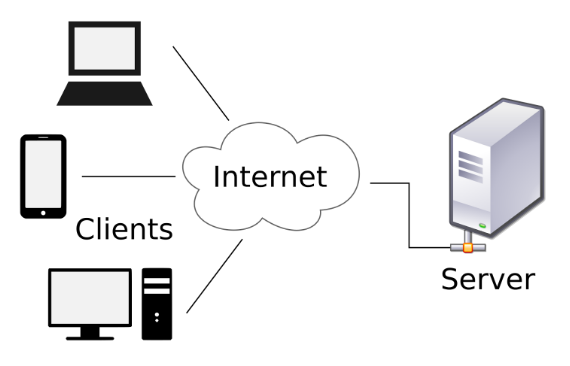
More specifically, the client-server model involves two processes, meaning running programs: one on the client machine and one on the server machine.
Based on these premises, communication follows this logic:
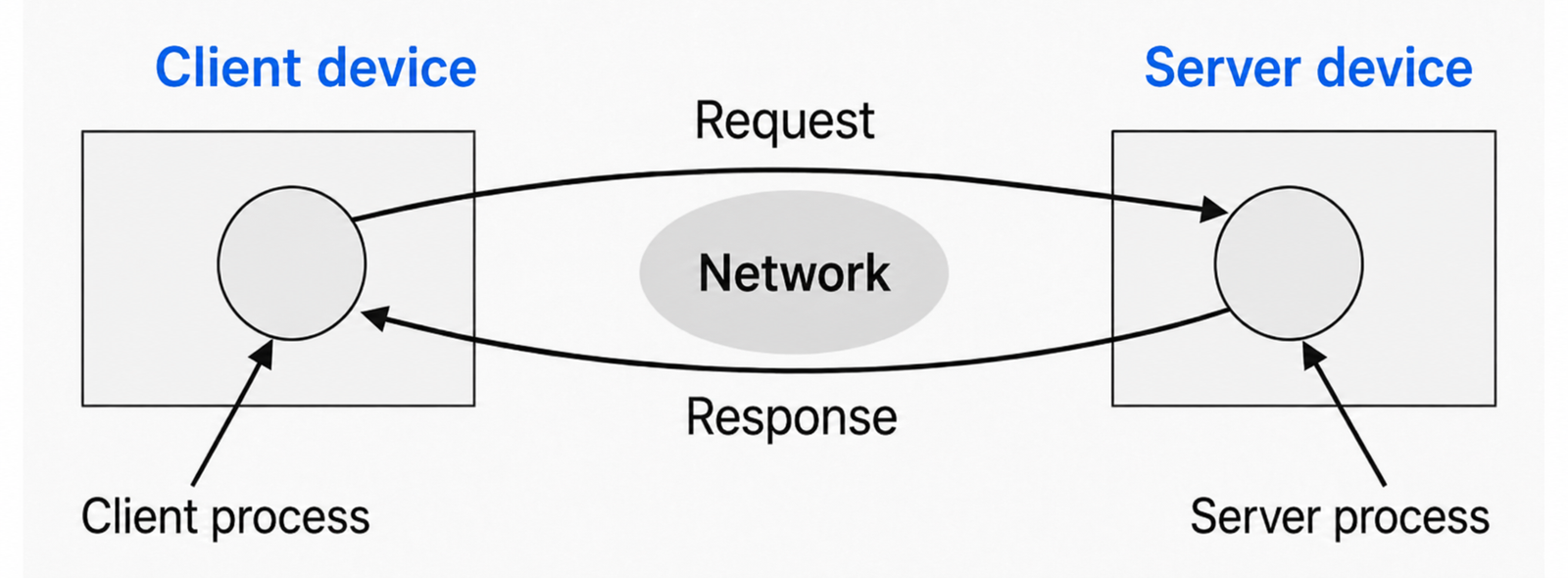
It is important to note that a server is not necessarily a physical machine: it can also be a software process that listens on a network port while waiting for client requests. The same machine can therefore host several servers at the same time, meaning several running applications or services, each reachable by clients (Kurose & Ross, 2026).
A client is not necessarily a physical machine either: it can be a software process that sends requests to a server to obtain a service. The same machine can run several client processes at the same time, such as a web browser, an email app, an online game, or a messaging app.
Clients and servers communicate through a communication protocol: a set of shared rules that enables them to interact for a specific purpose (Kurose & Ross, 2026).
Client
The term client refers to a computer component or subsystem that accesses the services or resources of a server.
A client can be hardware or software:
For example, one of the most important software clients is the browser, a program specialized in displaying web pages obtained from a server.
In some systems, the client mainly acts as an interface to the server; in others, it can be highly complex software capable of processing large amounts of data locally.
Some systems, such as email, are divided into a client component, running on the client computer, and a server component, running on the server.
Example
When using Gmail via a browser or app, the user interface acts as the client. The messages, however, are stored on the service’s server systems.
The client sends requests to the server, which retrieves the data and returns it for display to the user.
Server
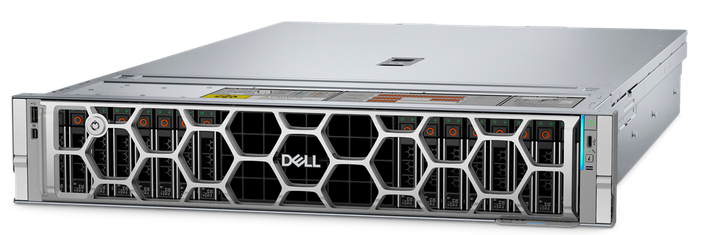
A server, from the verb “to serve”, is a device or software program that provides services to other devices or programs, called clients (Tanenbaum et al., 2022).
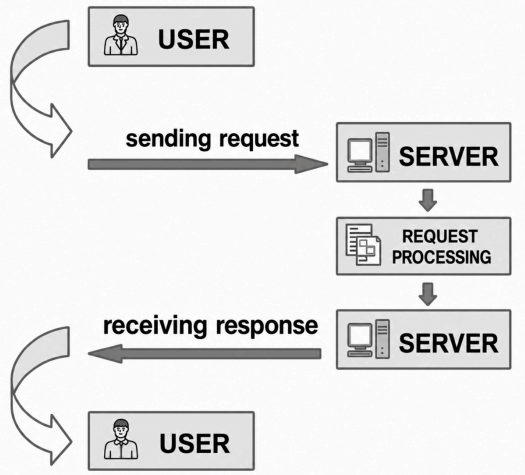
Depending on the context, the term “server” can therefore refer to:
A server may manage user access, allocate and release resources, share data, and protect information.
Example
An email server can be compared to a post office.
Users must be authorized before they can access their email account through a client.
Similarly, a user must have the key to the mailbox located at a post office in order to collect their mail.
Types of servers
In many cases, when we talk about servers, we are referring to software services: programs that perform specific functions and respond to client requests.
The most important services are:
Data center
A data center is a specialized facility designed to house servers and all the components connected to them, including storage devices, networking equipment, security systems, and power infrastructure (Barroso et al., 2026).
A data center stores, processes, and distributes large volumes of data continuously, reliably, and securely.
In essence, data centers are “information factories”: places where data lives, moves, and is managed 24 hours a day.
A fundamental part of a data center is the server farm, an organized collection of servers installed in the same physical location.
A server farm consists of metal cabinets called racks, each of which contains dozens of servers.

These servers host websites, databases, business applications, streaming video, and even the virtual worlds of online games.
In addition to the server farm, a data center includes:
The entire system is designed to provide high availability, meaning continuous operation even under critical conditions (Barroso et al., 2026).
An interruption lasting only a few seconds can cause enormous financial losses or reputational damage for digital service providers.
Without data centers, the Internet as we know it would not exist.
Most digital services we use every day, such as email, messaging, video streaming, social networks, and cloud platforms, rely on one or more data centers.
Corporate information systems, banks, hospitals, navigation apps, and digital public services also rely on these infrastructures.

Peer-to-peer system
The client-server model is the most widely used on the Internet, but another popular model also exists: peer-to-peer (P2P).
A peer-to-peer network is a network model in which connected devices, called peers, can communicate directly with one another without necessarily depending on a central server (Kurose & Ross, 2026; Tanenbaum et al., 2022).
The English word peer means “equal”. This helps explain the main concept: in a peer-to-peer network, computers are not rigidly divided into clients and servers, but can perform both roles.
A device can therefore:
Each peer can act as a client when requesting a resource and as a server when providing one.
In the client-server model, communication is organized around one or more main servers. Clients do not always communicate directly with one another and often communicate through the server.
For example, when we visit a website, our browser is the client and the web server is the system hosting the requested pages. The client sends a request, and the server responds by sending the necessary data.
In the peer-to-peer model, however, devices can exchange data directly.
There is not necessarily a central server controlling all communication.
This is the most important difference: the client-server model is more centralized, whereas the peer-to-peer model is more distributed (Kurose & Ross, 2026).

Each peer can make some of its resources available, for example files, storage space, processing power, network bandwidth, and information useful to the operation of the system.
For this reason, the overall operation of a peer-to-peer network depends on cooperation among many peers.
Example
Imagine a classroom in which every student has a different file on their computer.
Not all peer-to-peer networks work in the same way. In simplified terms, we can distinguish between pure P2P networks and hybrid P2P networks.
One of the best-known uses of peer-to-peer networks is file sharing.
In a P2P file-sharing system, a file can be divided into many parts.
Each peer can download different parts of the file from different peers and, at the same time, share with others the parts it already has.
This mechanism is very different from traditional downloading from a single server. In the client-server model, if many users download the same file from the same server, that server can become overloaded. In the P2P model, by contrast, as more users join the network, the number of possible download sources also increases (Kurose & Ross, 2026).
For this reason, P2P can be very efficient for distributing large amounts of data.
The peer-to-peer model offers several advantages:
However, the peer-to-peer model also has some disadvantages:
One of the fundamental questions in a peer-to-peer network is: how does a peer find the other peers?
In the client-server model, the client knows the server’s address, for example through a URL or an IP address. In the P2P model, however, peers may be numerous, change over time, and connect from different networks.
To solve this problem, P2P networks can use different discovery mechanisms.
Torrent
One of the best-known examples of peer-to-peer technology is BitTorrent.
In everyday language, however, the word “torrent” is often used to describe a download system based on the BitTorrent protocol.
BitTorrent is a communication protocol designed to distribute files among many devices connected to a network (Cohen, 2008).
Unlike traditional downloading, in which a client downloads a file from a single server, a torrent system distributes the file among many users.
Every user participating in the exchange is a peer. This means that each peer can both receive data and send it to others.
Traditional downloading works quite simply: the client sends a request to a server, and the server sends the requested file.
For example, if we download a program from the manufacturer’s official website, our computer connects to the company’s server and receives the complete file from it.
In a torrent, however, the file does not necessarily come from a single server. It is divided into many small parts, called pieces or blocks. Our computer can download some pieces from one peer, others from another peer, and so on (Cohen, 2008).
At the same time, while downloading, we can share the pieces we have already received with other users.
This is the key point: in a torrent system, users who download can also help distribute the file.
A torrent download is often started using a small file with the “.torrent” extension.
This file does not contain the actual content we want to download. For example, if we want to download a video, the .torrent file does not contain the complete video.
Instead, the .torrent file contains information useful to the torrent program, such as:
A .torrent file is therefore a kind of “map” that tells the program what to look for and how to reconstruct the final file (Cohen, 2008).
Using a torrent requires a dedicated program called a torrent client.
Examples of torrent clients include qBittorrent, Transmission, µTorrent, and BitTorrent Web.
The torrent client reads the “.torrent” file or a link called a magnet link, searches for available peers, and begins downloading the pieces of the file (Hazel & Norberg, 2008).
The client also reassembles the downloaded pieces in the correct order until the complete file is obtained.
A magnet link is a link containing the essential information needed to identify the file to be downloaded. Instead of first downloading a “.torrent” file, the user can open the magnet link directly with a torrent client (Hazel & Norberg, 2008).
The client uses this information to find other peers and retrieve the data needed to begin the download.
From the user’s point of view, a magnet link is often more convenient because it only requires clicking a link.
Two terms are often used in torrent terminology: seed and leech.
The more seeds there are, the easier and faster it is to download the file, because more complete copies are available on the network.
If there are only a few seeds, the download may be slow or may stop because some pieces of the file can be difficult to find.
The set of peers sharing the same file is called a swarm.
A swarm therefore consists of all the users participating in the distribution of a specific piece of content: some have the complete file, while others have only part of it.
Torrent systems mainly use two methods to find the peers in the swarm for a specific piece of content: trackers and DHT.
A tracker is a server that helps peers find one another. It does not necessarily contain the file being downloaded, but it keeps information about the peers participating in the swarm. When a torrent client wants to download a file, it can contact the tracker to obtain a list of other available peers (Cohen, 2008).
DHT stands for Distributed Hash Table. It is used to find other peers without relying on a single central server.
Instead of asking a tracker who is sharing a file, the torrent client queries a distributed network made up of many peers.
We can imagine it as a large directory distributed across many computers: each peer knows only part of the information, but by cooperating with the others it makes it possible to find the peers sharing a particular torrent.
Using DHT, the client does not query every peer in the network.
Instead, it uses the torrent information to progressively contact nodes in the distributed network until it finds peers sharing that content (Loewenstern & Norberg, 2008).
Key points
What Is the Client Actually Doing?
A student is using the following applications simultaneously on their computer:
The student says:
“My computer is the client, and all the computers it connects to are servers.”
Analyze this statement.
Designing a School’s Services
A school wants to build its own IT infrastructure.
It needs to provide the following services:
For each service:
A Service That Cannot Stop
A streaming platform is used by millions of users. Its managers are considering hosting all the required services on several servers installed in a normal room at the company.
The room has an Internet connection and electrical power, but it has no dedicated cooling systems, generators, UPS systems, or advanced security systems.
Analyze the proposed solution.
Client-Server or Peer-to-Peer?
A school needs to distribute a 4 GB video file to 500 students.
Two solutions have been proposed.
Compare the two solutions.
Pure P2P or Hybrid P2P?
An application allows users to share files directly between their computers.
When a new user opens the program, however, the software contacts a central server that provides a list of other available users. Once the other devices have been found, the files are transferred directly between users and do not pass through the central server.
A student says:
“It cannot be peer-to-peer because there is a server.”
Evaluate this statement.
Analyzing a Torrent Download
You want to legally download an ISO image of a Linux distribution using BitTorrent.
You open a magnet link with a torrent client. The program finds a swarm consisting of:
During the download, your computer receives different pieces of the file from different peers while simultaneously sending other users some of the pieces it already has.
Analyze what is happening.
To create these materials, I used generative artificial intelligence tools to support the writing process, particularly to improve the wording and style of the text, reorganize content, refine phrasing, and speed up certain editorial tasks.
Since I work independently on the production of these materials, I try to automate all activities that can reasonably be automated, so that I can devote more time to research, design, and content development.
However, artificial intelligence does not determine the content of the work: the selection of topics, structure, ideas, interpretations, examples, and teaching approach are developed by me. AI is therefore used primarily as a tool to support production and formal revision, while authorship and responsibility for the design and development of the content remain mine.
Unless otherwise stated, this material is licensed under the Creative Commons Attribution–NonCommercial–ShareAlike 4.0 International License (CC BY-NC-SA 4.0).
You are therefore free to share, redistribute, adapt, and create derivative works based on this material, provided that proper attribution is given, the material is not used for commercial purposes, and any modified or derivative versions are distributed under the same license.

Do you want to help me write articles like this one?


No responses yet