
From distributed systems to cloud computing

This lesson introduces the concept of a distributed system, explaining how multiple computers, servers, and software components can collaborate over a network to provide a single service. The text highlights the importance of scalability, reliability, availability, and transparency: the user perceives the system as a single entity, even though resources are distributed across multiple machines.

The role of middleware is then introduced; it facilitates communication between different components and hides some of the infrastructure’s complexity. In the second part, the lesson links distributed systems to cloud computing, showing how services such as Spotify, Instagram, and Google Drive rely on servers, data centers, and remote resources accessible via the Internet.

Distributed system

In many real-world services, the infrastructure is highly complex: multiple computers, servers, and software components work together to provide a single service.
In these cases, we speak of distributed systems.

A distributed system is a computing model in which multiple components connected through a network cooperate to perform a task or provide a service. Hardware and software resources are not all located on a single computer, but are distributed across multiple interconnected machines (van Steen & Tanenbaum, 2023).
The goal of a distributed system is to use the available resources efficiently, improving the scalability, reliability, and availability of the overall system (van Steen & Tanenbaum, 2023).
For example, if a service is distributed across multiple servers, it can handle more users at the same time and continue operating even if part of the infrastructure experiences a problem.

An important characteristic of distributed systems is transparency: users and developers can perceive the system as a single coherent entity, even though its resources are distributed across multiple computers.

In a distributed system, the existence of multiple computers is invisible to the user, who has the impression of interacting with a single computing system.
Middleware is software that acts as an intermediary between applications or software components within a distributed system. It is thanks to middleware that the user perceives this transparency (van Steen & Tanenbaum, 2023).
Its main purpose is to facilitate communication, management, and interaction among the different parts of a system, especially when those parts may be located in different areas of a network.
Many distributed systems use middleware to achieve transparency.
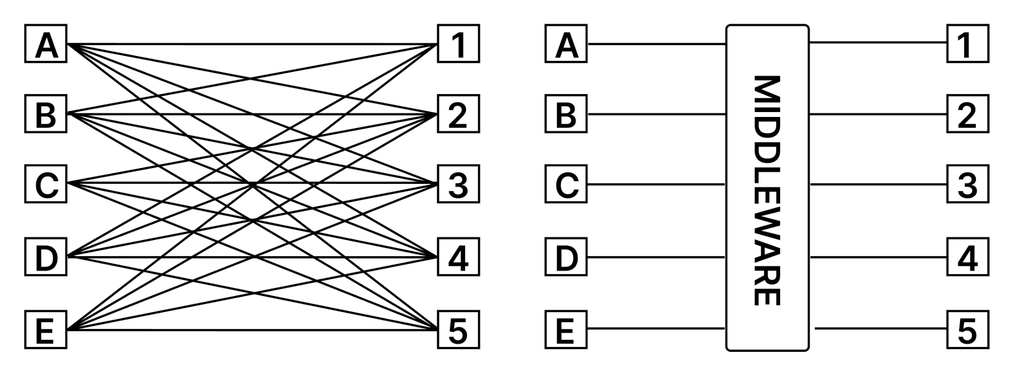
On the left, a computer network without middleware; on the right, one with middleware

Example
Spotify is a music streaming service that allows users to listen to music online from a vast catalogue of tracks. 
This service is provided through a distributed architecture because the tracks are stored on servers around the world, yet the user is unaware of this and perceives that they are interacting with a single entity.

Cloud computing

One technology that makes extensive use of distributed systems is cloud computing (Buyya et al., 2011).
In the past, many software applications were installed and run mainly locally, meaning on the user’s device. 
Today, however, many computing services rely on remote infrastructure accessible through the Internet.

As networks have evolved and become much faster and more secure, computing services have been moving from local software to web services. The user accesses the application’s interface through a browser, while the actual work is performed by the server, which sends the interface only the result to be displayed.

This change benefits the user because their device does not have to handle the application’s entire workload, since part of the work is performed by remote servers.
The concept of using computing services through a network is called cloud computing. It goes beyond the simple presence of resources on the Internet and involves accessing and using virtual resources as services (Mell & Grance, 2011). 
These services may include data storage, data processing, application delivery, data analysis, and much more.
Therefore:

  • Cloud computing is a model for delivering computing services over the Internet. Instead of using only local resources, such as the storage or processing power of their own computer, users can access remote resources, including storage space, applications, processing power, databases, and other services (Mell & Grance, 2011).
  • In cloud computing, a significant part of the processing, storage, or service management takes place on distributed remote systems. The user’s device may simply display the interface and send requests, although in many cases it still performs some processing locally.

The term cloud refers to the set of hardware and software resources that make cloud computing possible: servers, storage systems, networks, software, and interconnected data centers (Liu et al., 2011; Mell & Grance, 2011).
Therefore:
The cloud represents a set of hardware and software resources that perform cloud computing.
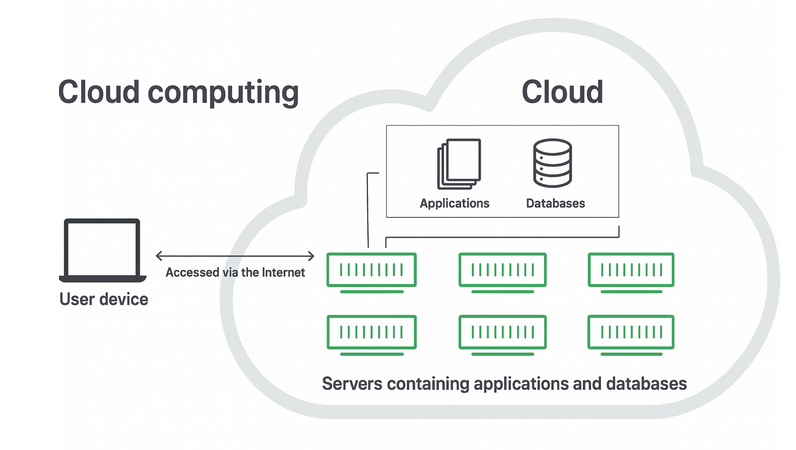
Cloud computing is a conceptual model that allows the user’s device to access the cloud through the Internet and use one or more services

The cloud allows users to access the same files and applications from virtually any device, because processing and storage take place on servers located in data centers rather than locally on the user’s device (Mell & Grance, 2011).
This is why a user can access their Instagram account on a new phone after the old one has broken and still find the account there, together with all the photos, videos, and conversation history.

Example
Google Drive is considered a cloud system for several reasons:

  • Remote storage: Google Drive allows users to store their files and documents on remote servers managed by Google. These files are not physically stored on the user’s device, but on Google’s servers in distributed data centers.
  • Access from anywhere: users can access their files on Google Drive from any Internet-connected device, such as a computer, tablet, or smartphone. This means that they can view, edit, and share their documents wherever they are.
  • Sharing and collaboration: Google Drive allows users to share their files with other people, enabling real-time collaboration. Users can work together on the same documents and see changes as they happen.
  • Automatic synchronization: changes made to files in Google Drive are automatically synchronized across all devices on which the user signs in to their account. This ensures that the latest versions of the files are always available.
  • Scalability: Google Drive provides users with flexible storage space that can be easily expanded according to their needs. Users can choose to purchase additional storage space when necessary.
  • Centralized management: users can organize and manage their files through an intuitive web interface. They can create folders, group files into categories, and use search tools to quickly find what they need.
  • Automatic updates: Google Drive is a service managed by Google, which means that users automatically benefit from new features and improvements without having to install updates manually.

For businesses, moving to cloud computing removes some IT-related and fixed costs. For example, they no longer need to update and maintain their own servers, because this is handled by the cloud service provider they use (Buyya et al., 2011).
This is particularly important for small businesses, which may not be able to maintain their own internal infrastructure but can cost-effectively outsource their infrastructure needs through the cloud.
The cloud can also make it easier for businesses to operate internationally, because employees and customers can access the same files and applications wherever they are, provided they have an Internet connection.

The cloud often relies on distributed systems because the service is provided by many coordinated resources, including servers, storage systems, networks, and data centers (Buyya et al., 2011; van Steen & Tanenbaum, 2023).
From the user’s perspective, however, this complexity is largely hidden: the service appears as a single application accessible through the Internet (van Steen & Tanenbaum, 2023).

Key points

  • A distributed system consists of multiple computers and software components that work together to provide a single service.
  • Resources are distributed across multiple networked machines.
  • The main advantages are scalability, reliability, and availability.
  • Transparency makes the system appear to the user as a single entity.
  • Middleware facilitates communication and coordination among the different components.
  • Cloud computing makes it possible to use remote resources over the Internet, such as applications, storage, databases, and processing power.
  • The cloud is the collection of servers, networks, software, storage systems, and data centers that provide these services.
  • Cloud services allow users to access data and applications from different devices.
  • The cloud facilitates sharing, synchronization, collaboration, and automatic updates.
  • Businesses can reduce costs by entrusting infrastructure and maintenance to a cloud provider.
  • The cloud often relies on distributed systems, but their complexity remains hidden from the user.

Download the lesson PDF

  • Buyya, R., Broberg, J., & Goscinski, A. M. (Eds.). (2011). Cloud computing: Principles and paradigms. Wiley. https://doi.org/10.1002/9780470940105
  • Liu, F., Tong, J., Mao, J., Bohn, R. B., Messina, J. V., Badger, M. L., & Leaf, D. M. (2011). NIST cloud computing reference architecture (NIST Special Publication 500-292). National Institute of Standards and Technology. https://doi.org/10.6028/NIST.SP.500-292
  • Mell, P., & Grance, T. (2011). The NIST definition of cloud computing (NIST Special Publication 800-145). National Institute of Standards and Technology. https://doi.org/10.6028/NIST.SP.800-145
  • van Steen, M., & Tanenbaum, A. S. (2023). Distributed systems (4th ed.). distributed-systems.net. https://www.distributed-systems.net/index.php/books/ds4/
  • Maarten van Steen and Andrew S. Tanenbaum, Distributed Systems, 4th ed., distributed-systems.net, 2023 — Provides a comprehensive introduction to distributed systems, with particular attention to transparency, middleware, communication, coordination, scalability, fault tolerance, replication, and the challenges involved in making multiple computers behave as a single coherent system.
  • George Coulouris, Jean Dollimore, Tim Kindberg, and Gordon Blair, Distributed Systems: Concepts and Design, 5th ed., Pearson — Explores the fundamental principles and architectures of distributed systems, including system models, interprocess communication, middleware, distributed services, replication, coordination, security, and the design of large-scale distributed applications.
  • Martin Kleppmann and Chris Riccomini, Designing Data-Intensive Applications, 2nd ed., O’Reilly Media, 2026 — Examines modern distributed architectures from a practical perspective, focusing on scalability, reliability, fault tolerance, replication, distributed data, cloud-based systems, and the trade-offs involved in designing services that operate across multiple machines.
  • Thomas Erl and Eric Barceló Monroy, Cloud Computing: Concepts, Technology, Security, and Architecture, 2nd ed., Pearson, 2024 — Provides a systematic introduction to cloud computing, explaining cloud models, virtualization and containerization, cloud infrastructure, scalability, resource management, security, service delivery, and the architectures used to provide computing resources over networks.
  • Rajkumar Buyya, James Broberg, and Andrzej M. Goscinski, eds., Cloud Computing: Principles and Paradigms, Wiley, 2011 — Explores the foundations of cloud computing and its relationship with distributed systems, including scalable infrastructure, distributed resources, service-oriented computing, cloud applications, and the technologies used to provide computing and storage as network-accessible services.

Behind a Streaming Service

A music platform allows millions of users to listen to songs through a single application. However, the music files and the services required for the platform to operate are distributed across many servers.

Answer the following questions:

  • Explain why this platform can be considered a distributed system.
  • Identify which elements of the system could be located on different machines.
  • Explain what advantage having multiple servers can provide as the number of users increases.
  • A server suddenly stops working, but users continue to use the service normally. Which characteristic of a distributed system is highlighted by this situation?
  • Users do not know which server contains the song they are listening to. Explain which principle of distributed systems allows them to perceive the entire infrastructure as a single service.

Making Complexity Invisible

A company has five applications that need to communicate with different servers distributed across the network.

  • In the first version of the system, each application must directly know how to communicate with each server.
  • In the second version, an intermediate software layer is introduced to manage communication between applications and services.

Analyze the two solutions.

  • Identify which component introduced in the second solution can be defined as middleware.
  • Explain what problem it is intended to solve.
  • Describe how the relationship between applications and servers changes after its introduction.
  • Explain why middleware can increase system transparency.
  • From the end user’s point of view, describe what difference should be noticeable between a well-designed system using middleware and one in which the distribution of resources is evident.

Local Application or Cloud?

A design studio must decide how to use a new software application.

  • Solution A: the program is installed entirely on the studio’s computers, and all files are stored on their local disks.
  • Solution B: the program is accessed through the Internet; documents are stored on remote servers, and a significant part of the processing is performed by the provider’s infrastructure.

Compare the two solutions.

  • Indicate which of the two more closely represents a cloud computing model.
  • Identify which resources are local and which are remote in each case.
  • Explain why, in Solution B, the user’s computer may have to handle a lower processing workload.
  • An employee changes computers and wants to continue working on the same documents. Explain which solution makes this easier and why.
  • Explain why using an application through a browser does not necessarily mean that the user’s device performs no processing.

The University’s Documents

A university wants to create a system similar to Google Drive. Each lecturer must be able to upload documents from their computer, edit them later from a tablet, and share them with other lecturers, who can work on the same files.

Conceptually design the service using the principles covered in the learning material.

  • Indicate which information or processing tasks should remain on users’ devices and which could be managed by the cloud.
  • Explain why documents must be stored on remote systems if they need to be available from different devices.
  • Describe what should happen when a lecturer edits a document on a tablet and later opens it on a computer.
  • Explain the role of automatic synchronization.
  • Explain why the system can be considered both a cloud service and a system based on distributed infrastructure.
  • Indicate which aspects of the infrastructure’s complexity should be hidden from the user through transparency.

A Small Company Has to Choose

A small company needs to create a new IT service. It has two options:

  • Solution A: purchase its own servers, install them on its premises, and directly manage maintenance and updates.
  • Solution B: use cloud services provided by an external provider.

The company also expects to grow over the next few years and hire employees who will work from different cities.
Evaluate the two options.

  • Explain which costs and activities can be reduced by choosing the cloud solution.
  • Explain why the cloud can be particularly attractive to a small business.
  • The number of users of the service increases rapidly. Explain what advantage related to scalability the cloud could provide.
  • Employees need to access the same files from different cities. Explain why the cloud makes this way of working easier.
  • Identify which activities that would be the company’s responsibility in Solution A can be entrusted to the provider in Solution B.
  • Choose one of the two solutions for this case and justify your decision using at least three concepts covered in the learning material.

Designing a Distributed Service

You have to design an online platform used by thousands of students to store, edit, and access documents from computers, tablets, and smartphones.

  • The first proposal is to install everything on a single computer: the application, the data, and user management.
  • A second proposal instead uses several servers and storage systems connected through a network and coordinated so that they provide users with a single service.

Analyze the two architectures.

  • Explain which of the two can be considered a distributed system and why.
  • Imagine that the number of students increases from 1,000 to 100,000. Explain which architecture offers greater ability to adapt and relate your answer to the concept of scalability.
  • Imagine that one of the machines fails. Explain how a distributed design could allow the service to continue operating.
  • Relate this situation to the concepts of reliability and availability.
  • Explain why users should not need to know which physical machine stores their document.
  • Indicate what role middleware could play in coordinating the different components.
  • Finally, explain why, from the user’s point of view, an infrastructure made up of many machines can still appear as a single application.

To create these materials, I used generative artificial intelligence tools to support the writing process, particularly to improve the wording and style of the text, reorganize content, refine phrasing, and speed up certain editorial tasks.
Since I work independently on the production of these materials, I try to automate all activities that can reasonably be automated, so that I can devote more time to research, design, and content development.

However, artificial intelligence does not determine the content of the work: the selection of topics, structure, ideas, interpretations, examples, and teaching approach are developed by me. AI is therefore used primarily as a tool to support production and formal revision, while authorship and responsibility for the design and development of the content remain mine.

Unless otherwise stated, this material is licensed under the Creative Commons Attribution–NonCommercial–ShareAlike 4.0 International License (CC BY-NC-SA 4.0).

You are therefore free to share, redistribute, adapt, and create derivative works based on this material, provided that proper attribution is given, the material is not used for commercial purposes, and any modified or derivative versions are distributed under the same license.

Do you want to help me write articles like this one?


Leave a Reply

Your email address will not be published. Required fields are marked *

No responses yet

Sostieni il progetto

Tutti i materiali che condivido nascono da una convinzione molto semplice: una buona formazione non dovrebbe limitarsi a insegnare quali pulsanti premere, ma aiutare a comprendere le idee, i principi e i processi che stanno dietro agli strumenti.

Per questo dedico una parte significativa del mio tempo a studiare, organizzare e produrre contenuti gratuiti dedicati al multimedia, al design e alla comunicazione visiva. Articoli, lezioni, approfondimenti e risorse che hanno l’obiettivo di rendere accessibili argomenti spesso affrontati in modo frammentario o superficiale.

Questo lavoro richiede però tempo, ricerca e cura. Ogni guida, ogni video, ogni materiale pubblicato gratuitamente è il risultato di molte ore di studio, scrittura e revisione.
Sostenere il progetto attraverso Patreon significa permettermi di continuare a produrre contenuti educativi di qualità, mantenerli accessibili al maggior numero possibile di persone e dedicare più energie alla costruzione di una risorsa che possa essere utile a studenti, professionisti e appassionati.

Se credi che una conoscenza più profonda, rigorosa e consapevole del multimedia abbia valore, il tuo contributo non sostiene soltanto il mio lavoro: aiuta a rendere queste risorse disponibili per tutta la comunità.
Grazie per il supporto e per la fiducia.

Patreon è troppo impegnativo?

Puoi sostenermi anche con una donazione libera, senza abbonamento e senza impegno.
Anche un piccolo contributo mi aiuta a continuare a creare giochi, contenuti didattici e materiali gratuiti con più libertà.

Support the project

All the materials I share stem from a very simple conviction: good training should not be limited to teaching which buttons to press, but should help people understand the ideas, principles, and processes behind the tools.

That is why I dedicate a significant portion of my time to researching, organizing, and producing free content focused on multimedia, design, and visual communication—articles, lessons, in-depth analyses, and resources aimed at making accessible topics that are often addressed in a fragmented or superficial way.

However, this work requires time, research, and care. Every guide, video, and piece of material published for free is the result of many hours of study, writing, and revision.
Supporting the project via Patreon enables me to continue producing high-quality educational content, keep it accessible to as many people as possible, and devote more energy to building a resource that benefits students, professionals, and enthusiasts alike.

If you believe that a deeper, more rigorous, and informed understanding of multimedia is valuable, your contribution does more than just support my work: it helps make these resources available to the entire community.
Thank you for your support and trust.

Is Patreon too demanding?

You can also support me with a voluntary donation—no subscription or commitment required.

Even a small contribution helps me continue creating games, educational content, and free materials with greater freedom.